


QuillBot vs Grammarly is a strange matchup. Both tools live in the same browser extension menu and promise cleaner writing, and they're routinely lumped together as rivals. Put them side by side across real professional work, though, and they turn out to be good at almost opposite things.
Writing client emails, internal updates, reports, and LinkedIn posts made the split obvious. This breakdown covers where each tool wins and what the plans actually give you in 2026.
QuillBot vs Grammarly: What's the difference?
QuillBot is a paraphrasing-first writing tool built to reword, summarize, and reshape text quickly.
Grammarly is a real-time grammar assistant built to catch spelling, tone, and clarity issues as you write.
Choose QuillBot if your main job is rewording, paraphrasing, or summarizing, or you need plagiarism checks and citations for academic or research work.
Choose Grammarly if you want real-time grammar, spelling, and tone corrections everywhere you write, without pasting text into a separate tool.
Meet QuillBot: Features and highlights
QuillBot started as a paraphrasing tool and grew into a full writing suite. The paraphraser is the core, with several modes (Standard, Fluency, Formal, Academic) and a synonym slider to control how much it changes.
Around it sit a grammar checker, summarizer, plagiarism checker, citation generator, AI detector, translator, and AI humanizer, all working on the web, through browser extensions for Chrome, Edge, and Safari, and inside Word and Google Docs.
Meet Grammarly: Features and highlights
Grammarly runs as a background assistant across your apps. It checks grammar, spelling, punctuation, clarity, and tone as you type, almost anywhere: your browser, desktop, mobile keyboard, Google Docs, and Microsoft Office.
Beyond corrections, it adds full-sentence rewrites, tone adjustments, plagiarism and AI-text detection, and a generative AI feature for drafting.
Grammarly renamed Premium to Pro and folded the old Business plan into it, so most individuals and small teams now buy the same tier.
QuillBot vs Grammarly: At a glance
Pricing correct as of August 2026.
QuillBot vs Grammarly: Feature-by-feature comparison
Grammar and spelling
QuillBot: The grammar checker catches everyday spelling and punctuation mistakes and is free to use, though its suggestions are lighter on tone than Grammarly and other alternatives.
Grammarly: It picks up grammar and spelling issues, explains its fixes, and covers clarity and tone alongside basic errors.
Winner: Grammarly. If clean, correct writing is the goal, its grammar engine is deeper and more accurate.
Paraphrasing and rewording
QuillBot: The modes let you rewrite the same sentence for a formal report or a plain-English email, and the synonym slider controls how far it strays from your original.
Grammarly: Ofers full-sentence rewrites, and its generative AI can rephrase text, but it doesn't give you the same range of rewriting modes or as much control over the output.
Winner: QuillBot. For rewording and summarizing, it's more flexible and purpose-built.
Real-time help across your apps
QuillBot: Works through its extension and integrations, but you often move text into its editor or a tool tab to get the most out of it.
Grammarly: Works live in the background wherever you write. Corrections appear as you type in Gmail, Docs, Slack, and most text fields, with no need to copy and paste.
Winner: Grammarly. For catching mistakes in the flow of real work, it's the smoother experience.
Originality tools (plagiarism and AI detection)
QuillBot: Includes a free AI detector, a plagiarism checker on Premium, and a citation generator, which is why it's a favorite for academic writing.
Grammarly: Bundles plagiarism detection and AI-text detection in the Pro plan, checking your work against billions of web pages.
Winner: Tie. QuillBot wins on free access and academic tooling; Grammarly wins on depth if you're already paying for Pro.
Pricing and value
QuillBot: Premium is $10/month on the annual plan, about half the $19.95 month-to-month price, and the entire toolset is included in that one plan.
Grammarly: Pro starts at $12/month on the annual plan ($144/year), $20/month billed quarterly, or $30/month month-to-month, which is one of the steeper monthly rates in the category.
Winner: QuillBot. For the money, you get more tools at a lower entry price.
What real users say
QuillBot
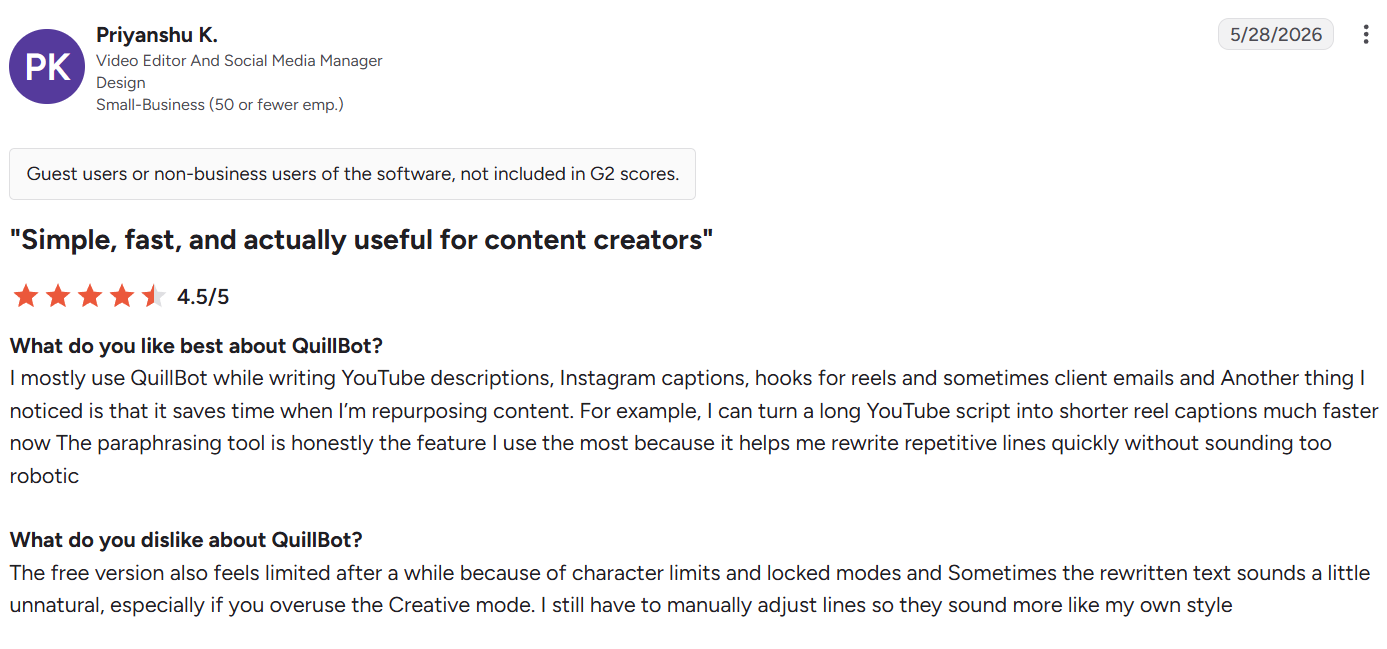
Pros
✅ Speeds up repurposing. The mode options let you rework one piece of content into several versions quickly, which suits social and marketing workflows. “It saves time when I’m repurposing content” – Priyanshu K., video editor and social media manager, G2
✅ Strong paraphrasing and summarizing. The paraphraser and summarizer cover the two jobs freelancers lean on most, turning long sources into usable drafts. “Useful platform for paraphrasing and summarising content” – Priya, freelancer, Capterra
Cons
❌ Outputs need a human check. At higher settings, the first rewrite can miss the mark, so results usually need a review before you use them. “I can't always trust the first paraphrased version” – Verified user in oil and energy, G2
❌ Can shift your meaning. Aggressive rewrites sometimes alter the point of a passage, which matters most for precise or technical text. “It can sometimes completely change your content overall message” – Cheryl, Capterra
Grammarly
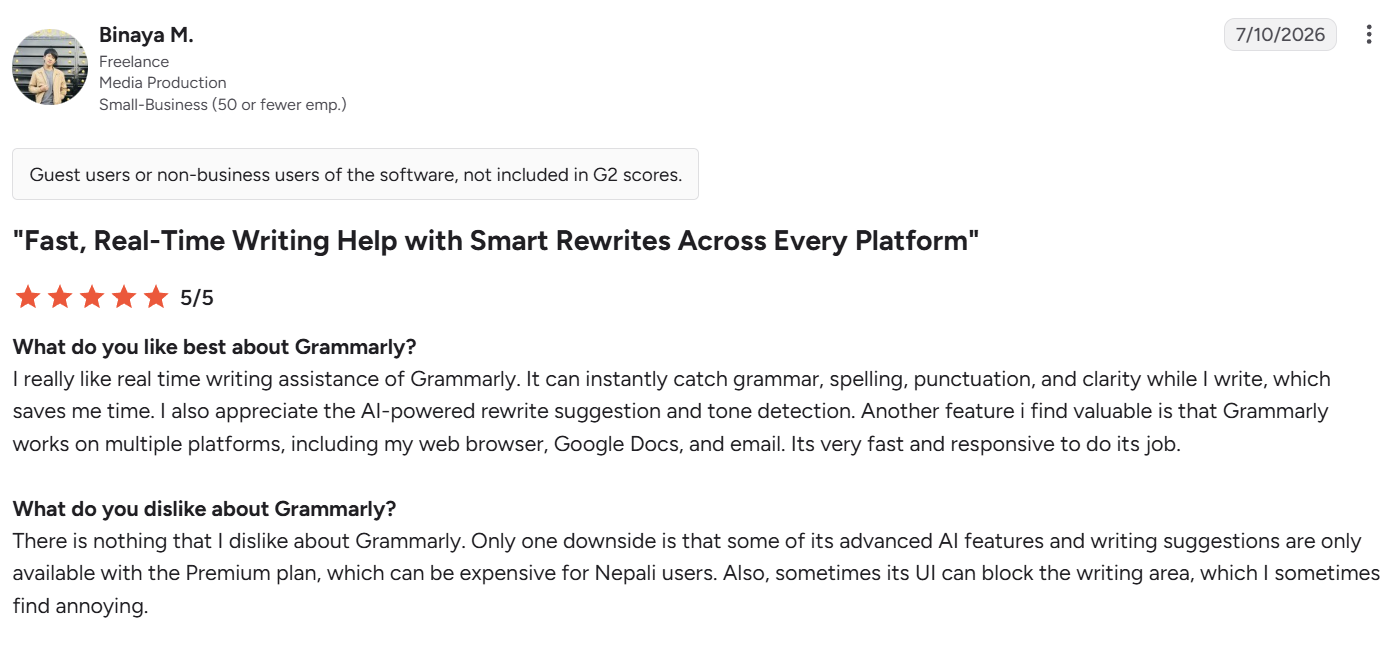
Pros
✅ Catches errors before they ship. Because it runs live in the apps you already use, mistakes surface the moment you make them instead of in a separate proofreading pass. “It can instantly catch grammar, spelling, punctuation, and clarity.” – Binaya M., freelancer, G2
✅ Helpful suggestions for non-native writers. The suggestions and explanations help people who use English as a second language produce cleaner, more natural text faster. “Very helpful for non-fluent English users” – Manpreet, Capterra
Cons
❌ The floating button gets in the way. The in-app button can sit over your text and interrupt the flow while you write. “Often, the button is over the top of what you are writing” – Jennifer P, Trustpilot
❌ Steep pricing. Some teams find the paid tier hard to justify next to cheaper alternatives. “Pricing for Grammarly Business seems excessive” – Zenith, a company founder, Capterra
QuillBot vs Grammarly: Which should you choose?
The right pick comes down to the kind of writing that eats your time.
QuillBot is better for you if you:
- Rewrite, reword, or summarize text as a core part of your work.
- Do academic or research writing and want plagiarism checks and citations in one place.
- Want the lowest entry price for a full writing toolkit.
Grammarly is better for you if you:
- Want mistakes and tone issues caught live, everywhere you type.
- Write across many apps (email, docs, chat) and don't want to switch tabs.
- Value grammar accuracy over rewriting range.
The verdict
There’s not one universal winner in the QuillBot vs Grammarly comparison, because each tool is best at a different job.
If your bottleneck is rewording and polishing text you already have, QuillBot does more for less. If your bottleneck is catching errors and fixing tone as you write across your tools, Grammarly’s the more accurate, lower-friction choice. Both share the same limit, though: they only work on writing that already exists.
The step before either tool: HyperWrite
HyperWrite works one step earlier than either tool, at the drafting stage, when there's nothing to polish or reword yet.
Its TypeAhead feature reads your open browser tabs and finishes your sentences in your own voice as you write. The first draft of an email or report arrives faster and already sounds like you.
It also stacks well with both tools. HyperWrite writes the draft, Grammarly cleans up the grammar and tone, and QuillBot rewords any passage that needs a different angle. Each tool has its own stage, so they run together in the browser without stepping on each other.
Tired of staring at a blank draft? Add the free HyperWrite Chrome extension and let TypeAhead write your next client email in your own voice, then hand it to Grammarly and QuillBot for the finishing touches.
Frequently asked questions
Is QuillBot better than Grammarly?
QuillBot isn't always better than Grammarly. QuillBot is stronger for paraphrasing, summarizing, and academic writing, while Grammarly is better for real-time grammar and tone checks across every app you write in. The best choice depends on whether your main task is to rewrite text or to correct it.
Can you use QuillBot and Grammarly together?
Yes, you can use QuillBot and Grammarly together. QuillBot handles rewording and summarizing, while Grammarly runs in the background to catch grammar and tone as you finalize. They don't conflict because each one focuses on a different stage of writing.
Does QuillBot check grammar like Grammarly?
QuillBot checks grammar, but not as thoroughly as Grammarly. QuillBot catches common spelling and punctuation errors, while Grammarly flags subtler issues and gives stronger clarity and tone suggestions.
Which tool is best for writing professional emails faster?
HyperWrite is best for writing professional emails faster because the slow part of an email is composing it, not correcting it. HyperWrite's TypeAhead suggests full sentences in your voice as you type in Gmail, and a quick pass in Grammarly then cleans up the grammar. QuillBot and Grammarly are better suited to polishing an email you've already written.

HyperWrite is the AI writing assistant that learns your style. It handles drafting, editing, and researching so you can focus on ideas.
- Autocompletes sentences as you type
- Works inside Google Docs & Gmail
- Adapts to your personal writing style
- 500+ AI tools for any writing task

Powerful writing in seconds
Improve your existing writing or create high-quality content in seconds. From catchy headlines to persuasive emails, our tools are tailored to your unique needs.