


Ever sent an email, waited days, then had to follow up just to get a simple answer? That usually comes down to how you wrote it. Here are the top professional email writing tips to help you get faster replies without chasing.
Why your emails aren’t getting replies
If you look back at the last email you sent that didn’t get a reply, there’s a good chance the ask isn’t clear in the first two lines. You probably explained the situation first, then got to what you needed later.
The problem is, most people don’t read emails top to bottom. They skim the opening, look for what they need to do, and if it’s not obvious, they move on.
If your email makes someone scroll or reread to figure out the ask, it gets delayed or ignored. The fix is using the right structure for the situation, so the reader knows what to do right away.
How to write an email professionally: 4 methods that get replies
Most emails fall into a handful of common situations. You just need to match the structure to what you’re trying to get done.
Method 1: The direct request email
What it is: An email that leads with what you need, then provides context. The ask comes first.
How it works: Open with the request in the first one or two lines. Then add only the context that the reader needs to act. Close with a clear next step or deadline.
This is the default structure for most emails, like quick questions, approvals, updates, or scheduling. If the person reading is likely to say yes or just needs to take action, use this.
The mistake most people make is leading with context. They explain the situation, give background, and only get to the ask halfway through. By then, the reader has already skimmed past it.
When to use it:
- You need a clear answer or decision.
- You’re asking for something specific, like a confirmation or feedback.
- The recipient doesn’t need much context to respond.
- The situation is straightforward and not sensitive (e.g., scheduling, updates, quick clarifications).
Weak version:
Hi Sarah,
Hope you're well!
I've been working on the Q3 report and wanted to touch base because I had a few questions about the budget figures from the spreadsheet you sent over.
When you get a chance, could you take a look?
Strong version:
Hi Sarah,
Can you confirm the Q3 budget figures by Thursday?
The numbers on slide 6 don't match the spreadsheet you sent on Monday.
Same situation, but the second version makes it obvious what needs to happen and by when. That’s why it gets a faster response.
Method 2: The indirect email
What it is: An email where you give the context first, then deliver the main point. You don’t lead with the ask because the recipient needs background to understand it.
How it works: Start with the key context the reader needs. Then state the main point or decision. Close with what happens next or what you need from them.
Use this when leading with the ask would come off wrong, like bad news, a delay, or a decision the reader won’t like. If you jump straight to the conclusion, it can feel abrupt or confusing.
Most people overuse this structure. They lead with context even when it’s not needed, which slows everything down. Only use it when the background actually changes how the message is received.
When to use it:
- You’re sharing bad news (e.g., “we’re pushing the deadline” or “this isn’t approved”) and don’t want it to sound like a mistake.
- You need to explain what happened before the decision makes sense (e.g., delays, missed targets, changing scope).
- The reader would question or react to the update without context.
- Starting with the main point would come off as abrupt or confusing.
Example:
Hi team,
The Henderson procurement team has changed three times this year, which has pushed our renewal timeline significantly. We haven’t been able to get sign-off within the original window.
Because of that, an end-of-September close isn’t realistic anymore.
Let’s align on new targets. I’ll send a time for later this week.
The context (three procurement changes) comes first because without it, "we missed the deadline" sounds like a failure. With it, the situation is clear.
Method 3: The follow-up email
What it is: A short, neutral email you send when a previous message has gone unanswered.
How it works: Reference your last email, restate the ask in one sentence, and give a deadline if one exists. Keep it to two or three short lines.
Don't apologize for following up. If you rewrite the whole email or start with “just checking in” or “sorry to bother you,” it weakens the ask and makes it easier to ignore again.
When to use it:
- You haven’t heard back after a couple of days on a normal request.
- You’re waiting on something specific (e.g., approval, confirmation, or input).
- A deadline is coming up and you still need a response.
- You want to prompt action without starting a new thread.
Weak version:
Hi Sarah,
Just checking in on this! Sorry to bother you again, I know things get busy.
Let me know when you get a chance.
Strong version:
Hi Sarah,
Following up on my October 3 email about the Q3 budget figures.
Can you confirm by Thursday or point me to the right person?
Method 4: The introduction email
What it is: An email to someone you've never contacted before, either within your organization or outside it.
How it works: Lead with who you are and why you're reaching out in one line. Make the relevance to the reader clear right after. End with one simple ask or next step. Keep the whole email to five sentences or fewer.
This is where most people write too much. They over-explain, add unnecessary background, and bury the reason for reaching out. If the reader has to figure out why this matters to them, they won’t respond.
When to use it:
- You’re reaching out to someone for the first time (e.g., a potential client, partner, or hiring manager).
- You’re making a cold request (e.g., asking for time or advice).
- You’re connecting with someone internally you haven’t worked with before.
- The reader has no context about who you are or why you’re emailing.
Weak version:
Hi Sarah,
Hope you're doing well!
My name is Jordan, and I work at BrightPath Solutions. I came across your profile and thought it would be great to connect. I’d love to learn more about what you’re working on and explore ways we might collaborate.
Let me know if you’d be open to a quick chat sometime!
Strong version:
Hi Sarah,
I’m Jordan from BrightPath Solutions. I’m reaching out because we’re working on a new onboarding flow, and your experience with SaaS UX at Notion stood out.
Would you be open to a 15-minute call next week to discuss?
How to write emails faster without rewriting them
Most of the time that people spend on email is just rewriting. You draft something, reread it, move sentences around, soften the tone, then rewrite the ask so it sounds clearer. That loop is what slows you down.
The obvious fix is to use AI. The problem is that most AI writing tools require you to leave your inbox, explain the context from scratch, copy the output, paste it back, and edit it until it sounds like you. You've saved maybe two minutes and broken your focus completely.
Here’s what that looks like in practice:
Writing with TypeAhead directly in Gmail
As you start typing your email, HyperWrite suggests the next part of the sentence in real time. Instead of stopping to think about phrasing, you keep writing and adjust as you go.
TypeAhead works by pulling context from your open tabs, so it already knows what email thread you're referencing and what doc you have open. Its suggestions reflect your actual situation instead of a generic interpretation of your request.

Getting a full draft without leaving your inbox
If you’re not sure how to structure the email, you can open HyperWrite in the Gmail sidebar and ask it to draft the whole message. You stay in Gmail, review the draft, and edit it instead of starting from a blank screen.
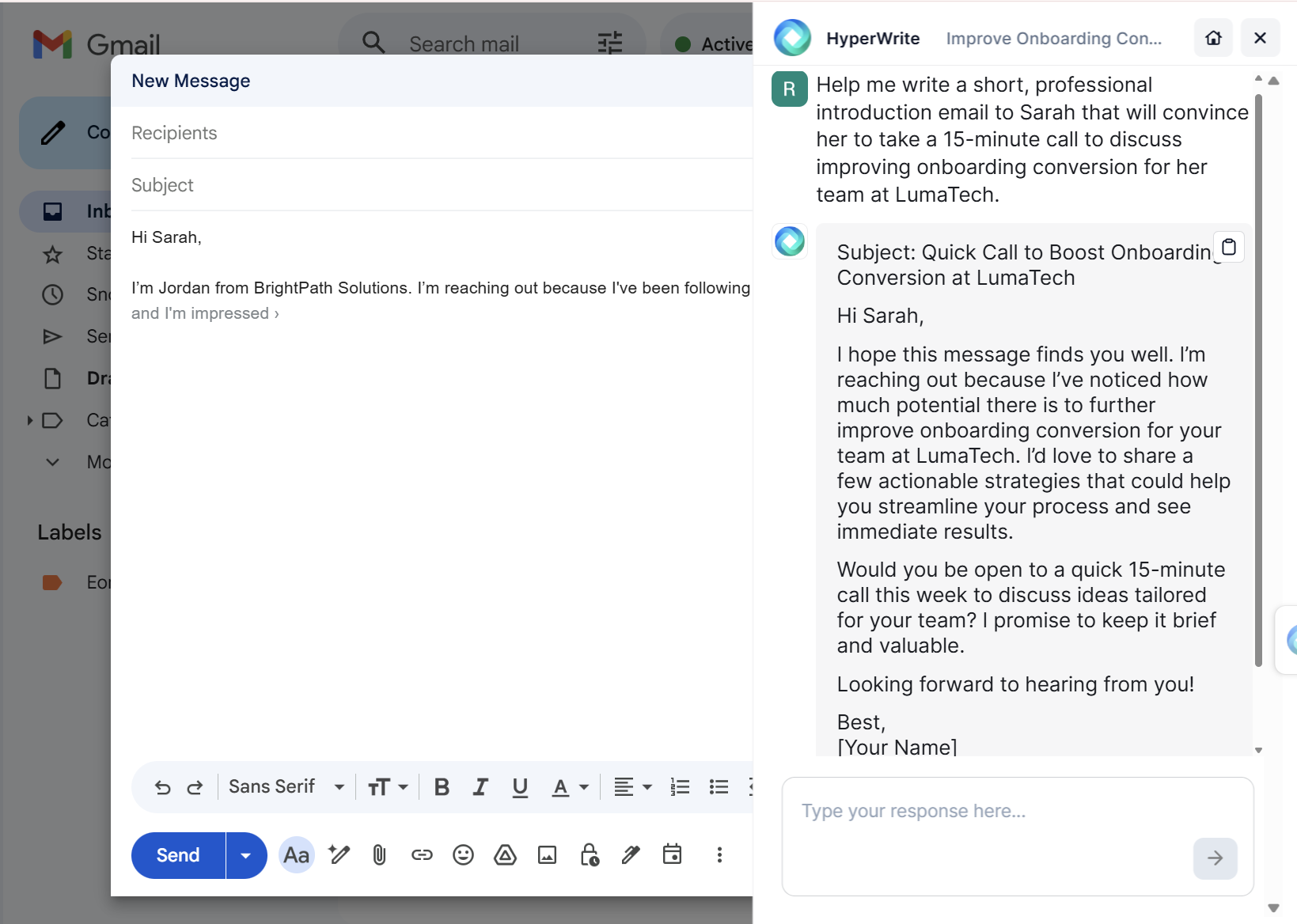
Switching between drafting and refining without breaking flow
You can start an email manually, use TypeAhead to move faster, then use the sidebar to generate or improve sections that feel off.
It also learns your voice. Through HyperWrite's Personas feature, TypeAhead matches your tone and phrasing over time, so the completions sound like you wrote them.

Best practices for professional email writing
Once you’re using the right structure, these small details make your emails easier to read and faster to respond to.
- Write subject lines people can act on. Vague subjects like “Quick question” get ignored. Be specific about what it is and what’s needed, e.g. “Approval needed: Q3 budget by Thursday.”
- Keep the body short and focused. Most emails don’t need more than a few short paragraphs. If it’s getting long, you’re probably adding context the reader doesn’t need. One way to catch this quickly is to rewrite or shorten your draft in one pass instead of manually trimming sentence by sentence.
- Assume it will be read on a phone. Long blocks of text are harder to process on mobile. Short lines and a clear opening matter more on a small screen. If your draft looks dense, that’s usually a sign it needs tightening before you send.
- Match the tone to the situation. A quick internal update doesn’t need the same formality as a first-time outreach. Adjust your greeting and sign-off based on who you’re writing to.
Write emails that get responses (Without overthinking them)
If you’re writing a lot of emails every day, the real challenge is doing it quickly without breaking your flow. HyperWrite helps with that. You can draft emails directly in Gmail with TypeAhead, generate a full message in the sidebar when you’re stuck, and quickly adjust tone or clarity without starting over.
You spend less time rewriting, more time sending emails, and get faster responses. Try TypeAhead free with the Chrome extension and see how much quicker your next batch of emails gets.
Frequently asked questions
How do you write a professional email that gets a response?
To write a professional email that gets a response, state your ask in the first two lines, make the subject line specific enough to act on, and end with a clear next step and deadline. Emails that don't get responses almost always have a buried ask or no clear indication of what the reader should do next.
What is the difference between direct and indirect email structure?
The main difference between direct and indirect email structure is where the main point appears. Direct emails lead with the ask or decision and then provide context. Indirect emails lead with background before the main point.
How long should a professional email be?
A professional email should be three paragraphs or fewer for most situations. The first paragraph states the ask or main point, the second provides brief context, and the third gives the next step or deadline. If your email needs more than three paragraphs, consider whether a meeting or call would be more effective.
How do you write a professional email to someone you've never met?
To write a professional email to someone you've never met, introduce yourself in one sentence, say why you're reaching out and why it's relevant to them in the second sentence, and end with one specific ask. Keep the whole email five sentences or fewer. The subject line should be specific: "UX research contract, Q4 project" rather than "Introduction."
Can HyperWrite help me write professional emails faster?
Yes, HyperWrite helps you write professional emails faster without losing your voice. Its TypeAhead feature works inside Gmail and suggests completions as you type, so you stay in flow instead of switching tabs.

HyperWrite is the AI writing assistant that learns your style. It handles drafting, editing, and researching so you can focus on ideas.
- Autocompletes sentences as you type
- Works inside Google Docs & Gmail
- Adapts to your personal writing style
- 500+ AI tools for any writing task

Powerful writing in seconds
Improve your existing writing or create high-quality content in seconds. From catchy headlines to persuasive emails, our tools are tailored to your unique needs.