
TypeAhead AI: How It Works + What Professionals Do With It


TypeAhead AI predicts your next sentence as you type, and it has become one of the biggest time-savers for professionals who write all day. Here's what it is, how it works, and how to use it.
What is TypeAhead AI?
TypeAhead AI is HyperWrite's real-time text prediction feature. It suggests your next words as you type, generated by AI, not pattern-matched from a dictionary. Press Tab to accept, keep typing to dismiss.
That's what separates it from the autocomplete you already know. Instead of finishing the word you started, TypeAhead reads the context of what you're writing and predicts where your sentence is going.
How TypeAhead AI works
The technology behind TypeAhead AI is closer to ChatGPT than to your iPhone's keyboard suggestions. Three things happen every time you type:
- Context capture: The tool reads what you've already typed in the current text field and what's open in adjacent browser tabs. That context is what TypeAhead uses to predict where your sentence is going.
- Real-time inference: TypeAhead AI processes the captured context and generates a likely continuation, fast enough to appear as you type without breaking your rhythm.
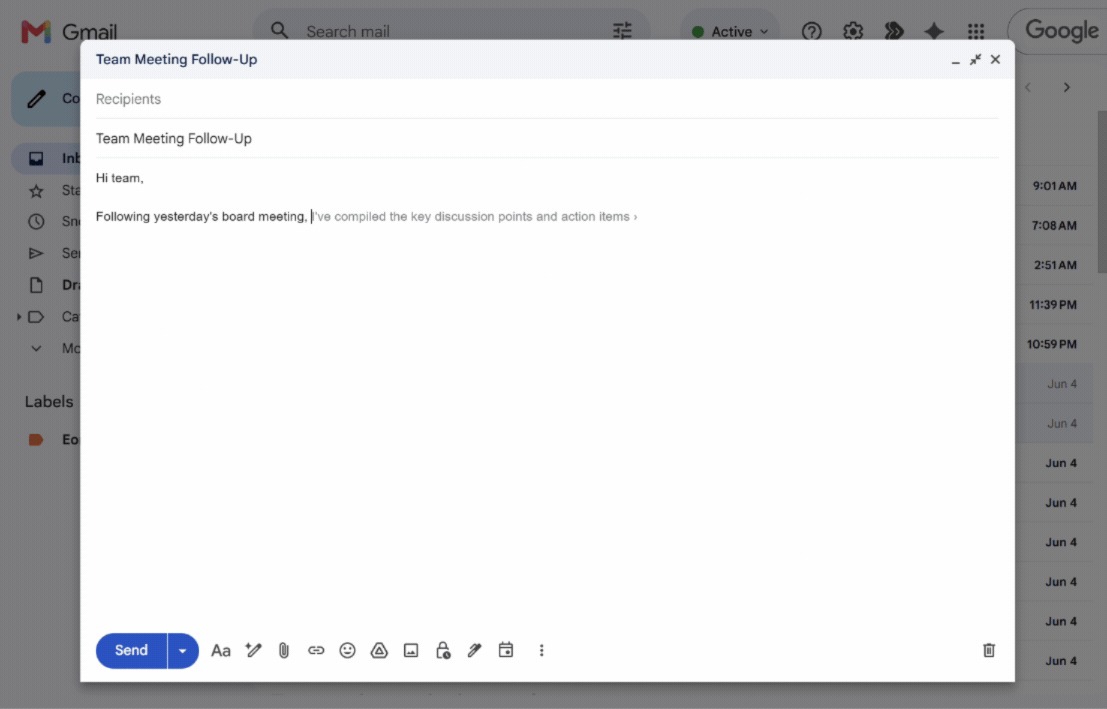
- Inline display: The predicted text appears as ghost text directly after your cursor. Press Tab to accept the full suggestion, the right arrow key to accept word by word, Alt + up or down arrow key to see more options, or keep typing to dismiss it. There's no pop-up, separate window or app switch.
This loop runs continuously. The result feels closer to having a writing partner alongside you than using a separate AI tool you have to prompt.
TypeAhead vs traditional autocomplete
The two get confused often, but they're built on different technologies and serve different jobs. Here's the side-by-side:
| | Traditional autocomplete | TypeAhead |
|---|---|---|
| How it works | Pattern-matches against a dictionary or list of saved phrases | Uses AI to generate predictions based on what you're writing and what's open in your browser |
| What it suggests | Single words or short common phrases | Full sentences and contextual replies |
| Reads context? | No, only the characters you've typed | Yes, including surrounding text and adjacent tabs |
| Adapts to your voice? | No, suggestions are the same for every user | Yes, suggestions adapt to your style over time |
| Where you see it | Phone keyboards, search bars, Gmail's basic suggestions | Inline in any browser text field (Gmail, Docs, LinkedIn, ChatGPT, and more) |
| Best for | Finishing common words faster | Drafting full sentences in your voice |
What professionals can do with TypeAhead
The use cases get more practical the longer you use it:
Draft emails faster without sounding robotic
TypeAhead shines in email because most professional email is half-template, half-personal. It handles the predictable phrasing, while you handle the parts that need your judgment. A reply that would have taken five minutes drops to 90 seconds without losing your voice.
Write social posts that sound like you
LinkedIn posts, X threads, and other professional social content benefit from TypeAhead AI more than most people expect. It learns your phrasing over time, so suggestions reflect how you actually write. The first sentence is yours, TypeAhead helps with the next few, and you adjust as needed.
Reply to messages without the context switch
Slack, LinkedIn DMs, customer support tickets, and other message-driven workflows usually involve dozens of short replies a day. TypeAhead suggests context-aware replies inline, so you don't need to leave the message to type a draft elsewhere and paste it back.
Get past the blank page
Most writers stall at the start of a sentence, not in the middle. TypeAhead helps with the opening words of a paragraph, an email, or a section heading. Even when the suggestion isn't quite right, it shows you a direction, which is often all you need to move past the blank page.
Write better ChatGPT prompts
Most people write a prompt, get a mediocre answer, then rewrite the prompt and try again. TypeAhead helps you get the prompt right the first time by suggesting clearer phrasing as you type.
The AI picks up on what you're trying to ask and completes the prompt in a way that's more specific and better-structured, so you spend less time iterating and more time using the output.
Worth the read: the real difference between ChatGPT, Grammarly, and HyperWrite
3 features that make TypeAhead different
HyperWrite's TypeAhead runs as a Chrome extension and works inside any browser-based text field on Mac, Windows, and Linux. Three features make TypeAhead stand out:
Cross-tab awareness
TypeAhead reads your open browser tabs, so its suggestions reflect what you're working on. Draft an email about a project, and it draws from the project doc you have open. Reply to a LinkedIn message, and the suggestions factor in the profile or article on screen.
Personas for voice matching
With Personas, you give HyperWrite samples of your past writing, and the AI uses them as a reference for how you actually sound. TypeAhead’s suggestions then match your phrasing, vocabulary, and tone instead of defaulting to generic AI voice.
Real-time speed inside the apps you already use
TypeAhead lives inside Gmail, Google Docs, LinkedIn, Notion, and ChatGPT, plus any other browser-based writing tool. There's no app to open, no platform to log into, and no copy-paste between writing surfaces.
Try TypeAhead on a real workday
The fastest way to know if TypeAhead fits your workflow is to use it for a morning. Try TypeAhead free with the Chrome extension, then reply to emails, draft LinkedIn messages, and write docs the way you normally would. After a few hours, you'll know whether the suggestions speed you up or get in the way.
Frequently asked questions
Does TypeAhead AI work in Gmail?
Yes, TypeAhead AI works in Gmail. HyperWrite's TypeAhead specifically supports Gmail through the Chrome extension, with real-time inline suggestions that appear as you draft emails. The tool also works inside Google Docs, LinkedIn, Notion, ChatGPT, and most other browser-based writing tools.
Is HyperWrite's TypeAhead free?
HyperWrite offers a free account with limited monthly credits, so you can try the product before committing. Unlimited TypeAhead is a Premium feature ($19.99/month or $16/month billed annually), which also includes 250 AI messages per month, 3 Custom Personas, and the full AI Tools Library.
Is TypeAhead the same as ChatGPT?
No, TypeAhead is not the same as ChatGPT. ChatGPT is a conversational AI assistant where you write prompts and receive responses inside a separate interface. TypeAhead is a writing assistant that runs inline as you type, suggesting completions for what you're already writing rather than generating content from scratch. The two tools complement each other.

HyperWrite is the AI writing assistant that learns your style. It handles drafting, editing, and researching so you can focus on ideas.
- Autocompletes sentences as you type
- Works inside Google Docs & Gmail
- Adapts to your personal writing style
- 500+ AI tools for any writing task

Powerful writing in seconds
Improve your existing writing or create high-quality content in seconds. From catchy headlines to persuasive emails, our tools are tailored to your unique needs.