


A new product gets one first impression, and an unclear announcement wastes it. Most launches compete for attention, so a clearer message improves your odds of getting noticed.
This product announcement template gives you a ready-to-use structure for any channel. Below you'll find the core template, versions for email, social, and press, what to include, and the common mistakes to avoid.
What is a product announcement?
A product announcement is a message that tells your audience about a new product, feature, or update and gives them a reason to act. It usually lands as an email, a blog post or press release, a social post, or an in-app message, and the strongest ones lead with the benefit instead of a list of features.
What to include in a product announcement
A few elements do most of the work. Cover them and readers get the full picture fast:
- A clear headline. What launched, in one line a scanner understands.
- The benefit. The change the product creates for the reader.
- Key details. Availability, price, and the date it goes live.
- Proof (optional). A quote, result, or early number that builds trust.
- One call to action. A single next step, like try it, buy, or get early access.
The product announcement template
Here is the core product announcement template. Fill in the brackets, then match the tone to your channel and brand.
Headline: [What's new] is here.
[Product name] is now available. It helps [audience] [achieve outcome] by [how it works].
[One line of proof, a key detail, or what's changed.]
[Availability, price, or launch date.]
[Call to action, the single next step, with a link.]
Filled-in example
Say we're launching a new scheduling app:
Headline: Meet Slate, your calendar's new brain.
Slate is now available. It helps busy teams cut meeting scheduling from ten emails to one link by reading everyone's availability automatically.
Early testers booked far fewer back-and-forth messages in their first week.
Free to start, with paid plans from $9 a month.
Try Slate free.
Product announcement templates by channel
The core structure flexes across channels. Here is how it shifts for the three most common.
Email announcement template
Subject: [Benefit-led hook, under 50 characters]
Hi [name],
[Product] is here. It helps you [outcome] by [how].
[Two or three short lines on what it does, why it matters, and one proof point.]
[Button: Try it free / Get early access]
[P.S. with a launch offer or deadline, optional.]
Social post template
[Bold claim or benefit in the first line.]
We just launched [Product]! [One line on what it does for the reader.]
[Call to action tied to the benefit, e.g. "Try it free today →"] [Link]
[relevant hashtags]
Press release template
FOR IMMEDIATE RELEASE
[Company] launches [Product] to help [audience] [outcome].
[Subhead: one line expanding the hook, e.g. the market shift or key result.]
[City, Date] — [Company] today announced [Product], a [category] that [what it does]. [One or two lines on the problem it solves and why now.]
[Second paragraph with context: market data, a stat, or what's changed for the audience.]
"[Quote from a leader on why it matters and what it means for customers]," said [Name, Title].
[Product] is available [where] starting [date], with pricing from [$X]. Learn more at [link].
About [Company]
[Two to three sentences on what the company does, who it serves, and any notable traction or backing.]
Media contact:
[Name]
[Email]
[Phone]
###
If you're writing the social post that goes with the launch, start from these social media engagement post ideas; for the formal version, work from one of these press release templates.
Product announcement examples worth studying
A few real announcements show these formats working. Each one leads with what changed and why it matters before getting to the details, and each does it a little differently.
Apple Upgrade: The clean press release
Apple's launch of Apple Upgrade is the textbook press release. It opens with a "PRESS RELEASE" tag and dateline ("CUPERTINO, CALIFORNIA"), then delivers the news in one sentence:
"Apple today announced Apple Upgrade, a new product leasing program provided by Klarna for iPhone, Apple Watch, Mac, and iPad available on the Apple Store online, in the Apple Store app, and at Apple Store locations in the United States."
Who launched what, for which products, in which channels: all in the first line. The executive quote lands second, then pricing ("starting at $17.99 per month"), then the product lineup. A clean model to copy for any formal announcement.
OpenAI Presence: The problem-first blog post
OpenAI's Presence launch flips the order. Instead of naming the product first, it opens on the reader's problem:
"The challenge for enterprises is no longer proving that AI agents can work, it's making them reliable enough to do high-value work in production."
Only after the problem lands does the product enter: "We're introducing OpenAI Presence, a battle-tested product that helps enterprises deploy trusted AI agents…"
It's a strong template for a benefit-led blog announcement, especially when your audience needs to feel the pain before they'll care about the fix.
Linear Diffs: The launch tweet that earns attention
Linear's launch tweet for Diffs is a clean model for a social announcement. In four lines and a bullet list, it does everything the format asks for:
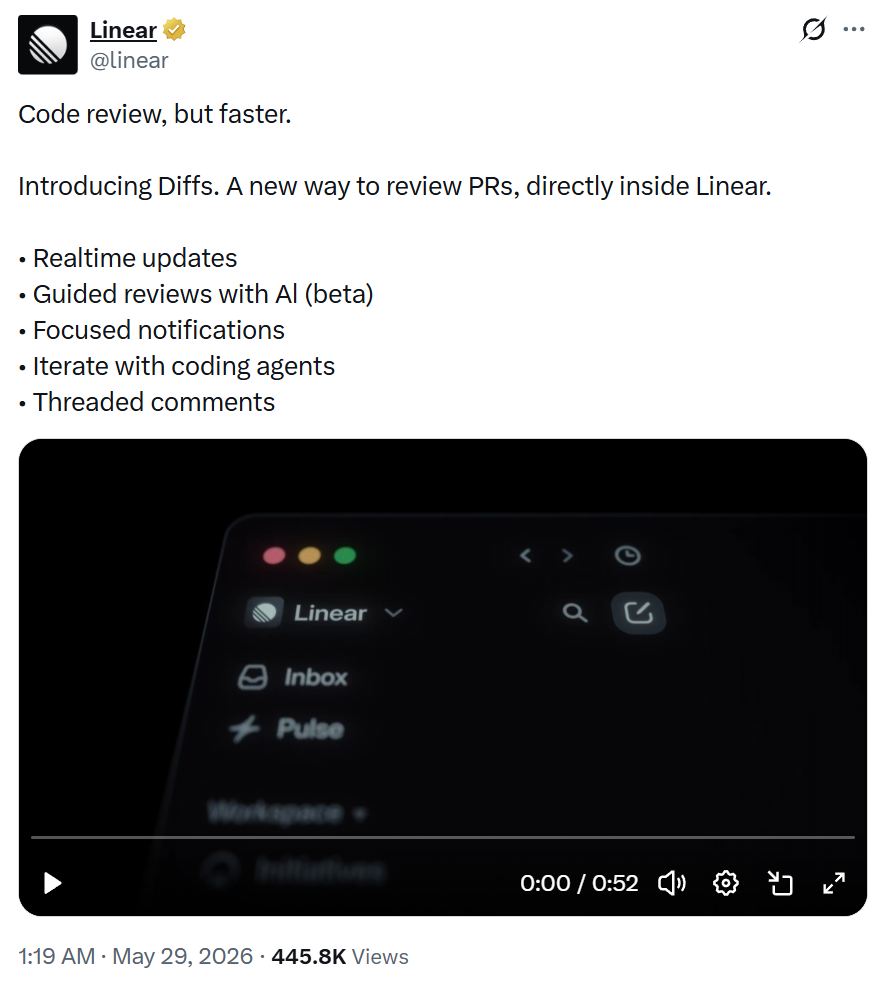
The first line is the benefit ("Code review, but faster"), not the product name. The second names the launch, then explains what it is in one line, with the parent product ("Linear") anchored at the end. Then the bullets do the heavy lifting a paragraph would in a blog post.
The tweet skips an explicit CTA and link, because Linear paired it with a demo video and posted from an account its audience already follows.
If you're launching to a smaller or colder audience, add the CTA and link the template calls for. Linear can get away without it, but most launches can't. Worth copying the structure either way: lead with the payoff, then let scannable bullets carry the details.
Tips to make your product announcement convert
The template gets your announcement written. These habits are what get it opened, read, and acted on.
- Make it scannable: Short paragraphs, one column, and a headline that stands on its own.
- Write a subject line worth opening: Specific and benefit-led beats clever and vague.
- Time it right: A teaser, a launch-day send, and a reminder reach people a single email misses.
Where product announcements fall flat
Weak announcements tend to fail in the same few ways. Watch for these four:
- Leading with features instead of benefits: A spec list makes readers work to see why they should care. Start with the payoff.
- Burying the news: If a reader can't tell what launched in the first line, they're gone. Put it up top.
- Cramming in every detail: Keep each announcement to one main message and one call to action. Save the rest for a follow-up.
- No clear next step: A message with no call to action wastes the attention it earned. Tell readers exactly what to do.
Write your product announcement faster
An announcement is short, but getting the wording right across email, social, and press takes time. That slow part is where a writing co-pilot helps.
HyperWrite turns one set of launch notes into every version you need. Flexible AutoWrite drafts the email, the post, and the release from one brief.
TypeAhead finishes each line in your voice as you type, pulling context from your open tabs, and Personas keeps every channel in your brand's voice.
You decide the message and the offer. HyperWrite just gets the drafts done faster.
Tired of rewriting the same launch for email, social, and press? Draft all three in your voice with TypeAhead, free to try in the HyperWrite Chrome extension.
Frequently asked questions
How do you announce a new product?
You announce a new product by leading with the benefit, stating what launched and who it's for, adding key details like price and availability, and closing with one clear call to action. A short sequence reaches more people than a single email: a teaser, a launch-day message, and a reminder.
What should a product announcement include?
A product announcement should include a clear headline, the main benefit, key details like availability and price, optional proof, and one call to action. Lead with why the product matters to the reader before listing what it does.
How long should a product announcement be?
A product announcement should be short enough to scan in under a minute. An email announcement usually runs 50 to 150 words, a social post far less, and a press release about one page. Cover the news, the benefit, and the next step, then stop.
Can you use AI to write a product announcement?
Yes, you can use AI to write a product announcement, as long as the details and offer stay yours. AI is useful for turning launch notes into a first draft for each channel and keeping the tone consistent. You still confirm the facts, the pricing, and the call to action.

HyperWrite is the AI writing assistant that learns your style. It handles drafting, editing, and researching so you can focus on ideas.
- Autocompletes sentences as you type
- Works inside Google Docs & Gmail
- Adapts to your personal writing style
- 500+ AI tools for any writing task

Powerful writing in seconds
Improve your existing writing or create high-quality content in seconds. From catchy headlines to persuasive emails, our tools are tailored to your unique needs.