
6 Best Rytr Alternatives for Content Teams and Creators in 2026


Rytr handles quick, low-cost copy, but it shows its limits once you need a stronger workflow beyond templates. After comparing the tools content creators usually switch to, I narrowed it down to the top six Rytr alternatives.
Why look for Rytr alternatives?
Rytr's biggest draw is still price. Its free plan is easy to try, the Unlimited plan stays affordable, and the template library is still useful when you need a fast caption, product description, or first draft.
The problem starts when your content gets more demanding.
- Long-form output needs too much cleanup. Rytr can get you moving, but blog posts, newsletters, and scripts often come out thin, repetitive, or too generic to publish without a full rewrite.
- Brand voice control is light. That’s fine for one-off copy, but limiting once you need a consistent tone across a newsletter, creator brand, or client account.
- The workflow is shallow. Rytr is fine for prompt-in, draft-out writing. It is weaker if you need SEO research, performance insights, collaboration, or real-time help while writing.
- You outgrow the value fast. Rytr is the right call when budget is the main filter. Once output quality starts costing you time, you’re not saving money anymore.
TL;DR: Which Rytr alternative should you choose?
Choose Jasper if you run a content team producing 20+ pieces a month and need brand voice control across multiple writers.
Choose HyperWrite if your daily writing happens across browser tabs and you want output that sounds like you.
Choose Claude if you want flexible long-form drafting, ideation, and rewrites without a structured content platform.
Choose Frase if SEO is your priority and you build content from the SERP backward.
Choose Anyword if you write conversion copy (ads, landing pages, email campaigns) and want predictive performance scoring before you launch.
Choose Writesonic if you run SEO-heavy publishing pipelines and want research, citations, and article structure in one tool.
Stick with Rytr if you write mostly short-form copy on a tight budget and don't mind editing the output yourself.
6 Best Rytr alternatives: At a glance
Pricing correct as of May 2026. All prices shown are based on annual billing. Monthly rates are higher. Verify current pricing with each vendor before purchasing.
The 6 best Rytr alternatives
These are the Rytr alternatives worth switching to once the drafts start feeling thin and the cleanup takes longer than the writing.
1. Jasper

Jasper works for content teams that need stronger control, better workflows, and more than template copy. It’s built for scale, and it shows when you’re juggling blog posts, landing pages, ads, email sequences, and repurposed social content.
Jasper gives you better brand controls, stronger campaign structure, and a more serious content workspace than Rytr.
Best for: Content teams publishing across multiple channels, agencies managing several brands, and creators turning one idea into a full campaign.
Key features
- Brand Voice: Learns your tone, preferred phrasing, banned words, and product terms so blog intros, email hooks, and landing page copy stay on-brand.
- Campaigns: Turns one campaign brief into a set of connected assets like blog posts, ad variations, email copy, and social posts without making you rebuild the prompt each time.
- Knowledge and style controls: Let teams feed in company docs, messaging rules, and examples so writers spend less time fixing drift across clients or channels.
Pros
- One brief can generate assets across multiple channels and formats.
- AI agents handle research, production, personalization, and optimization inside the same system.
- Brand voice and team controls keep messaging consistent across campaigns, clients, and writers.
Cons
- Hard to justify the price unless you're publishing at volume across multiple channels.
- Overwhelming if your workflow is mostly short-form or one-off drafts.
- Needs a built-out process to get value from.
Pricing
- Pro – $59/month annual or $69/month billed monthly (7-day free trial)
- Business – custom pricing
2. HyperWrite

HyperWrite is built for people who write every day, move fast, and still sound like themselves. What stands out is its TypeAhead, a Chrome extension that pulls context from your open tabs and writes in your voice across every tool in your browser, from Gmail to Google Docs to LinkedIn.
If most of your writing happens across multiple tabs and you're tired of output that sounds like generic AI, HyperWrite is worth a serious look.
Best for: Newsletter writers and solo creators, founders creating thought leadership content and marketers who draft across Docs, Gmail, and browser-based tools.
Key features
- TypeAhead: Pulls context from your open browser tabs and personalized writing samples to suggest the next sentence as you type across Gmail, Google Docs, LinkedIn, or any other tab, so the suggestions sound like you.
- Personas: Learns your tone and sentence patterns so every output reflects your voice instead of default AI phrasing.
- AI Tools Library: Ready-made tools for rewriting paragraphs, expanding outlines, drafting hooks, summarising research, and repurposing one idea into several formats.
Pros
- TypeAhead works across every tab simultaneously, so you're never switching tools to get writing help.
- Output sounds closer to your actual voice than most AI writing tools.
- Affordable entry point for solo creators, with a free plan that's genuinely usable before committing.
Cons
- No SEO research, SERP analysis, or optimization features.
- Built for individual workflows; light on collaboration, approvals, and shared team features.
- Most of the value lives in the Chrome extension, so it's a poor fit if you don't write in the browser.
Pricing
- Free plan available
- Premium at $19.99/month ($16/month if billed annually)
- Ultra $44.99/month ($29/month if billed annually)
3. Claude

Claude is a useful Rytr alternative for creative work like article outlines, script shaping, angle testing, and rewriting rough drafts. It’s also strong for research when you need to summarize source material and pull out key points.
Best for: Writers drafting longer posts, creators developing scripts or newsletters or anyone who wants a general writing partner instead of fixed templates.
Key features
- Long-context drafting: Handles large source docs, notes, transcripts, and rough outlines well, which helps when you’re turning messy material into a clean first draft.
- Rewrite and expand workflows: Takes a weak paragraph, flat outline, or rushed script and gives several stronger directions without locking you into one template.
- Project-based chat: Works well when you want to refine one piece over several rounds, like tightening a newsletter, restructuring a blog post, or testing alternate hooks.
Pros
- Helps develop ideas and drafts that are still messy or incomplete.
- Great for long-form drafting and rewriting when you need several iterations to get the structure and tone right.
- Easy to use across different kinds of content because it adapts to the workflow instead of forcing one format.
Cons
- It’s more open-ended than process-driven, which can slow people down if they want a guided workflow.
- You usually need to give it clearer direction than a template-based writing tool.
- It is less useful for creators who want built-in SEO planning and optimization features.
Pricing
- Free plan available
- Pro – $20/month or $17/month billed annually
- Max (5x) – $100/month
- Max (20x) – $200/month
4. Frase
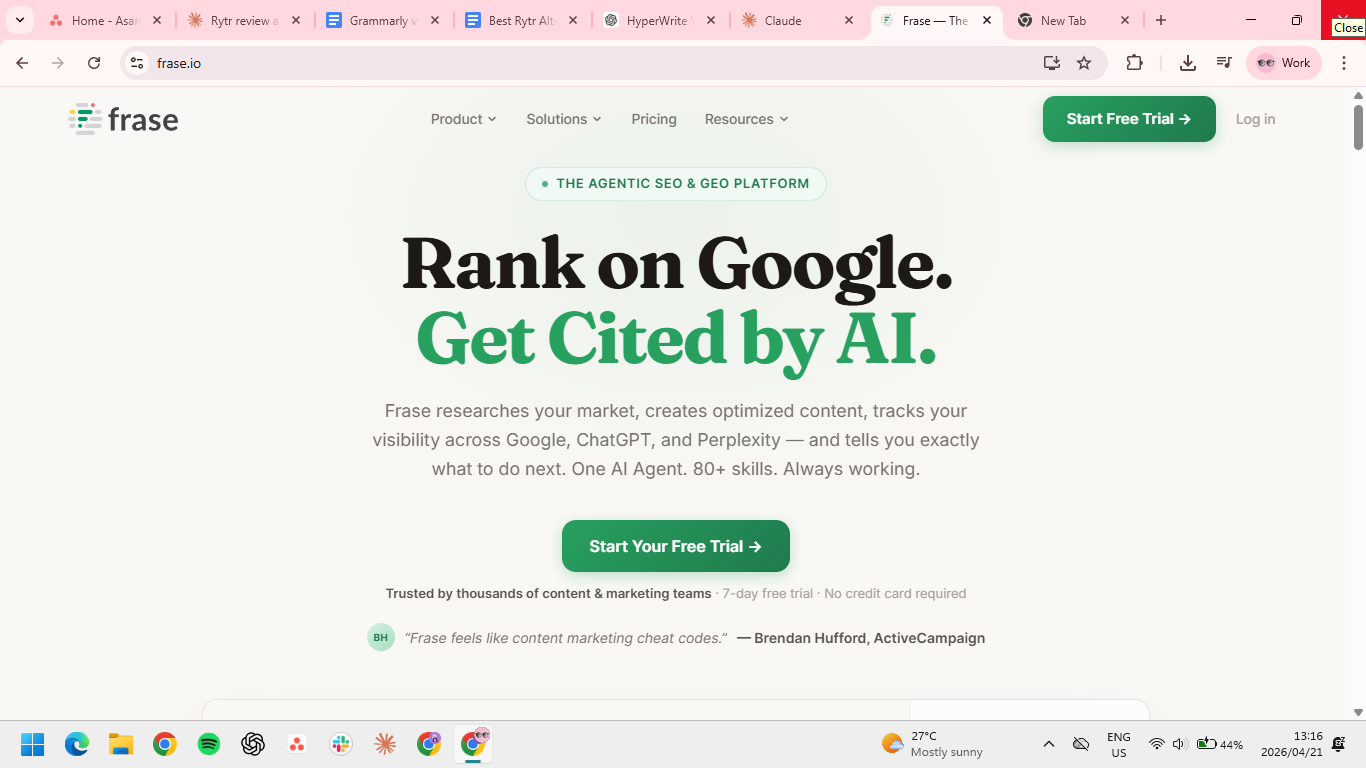
Frase works for SEO-first creators who care about ranking on Google and getting cited by AI search. If your workflow starts with the SERP, Frase is a much better option than Rytr. It helps you figure out what the page should cover, what competitors are doing, and how to tighten the draft before publishing.
In 2026, every Frase plan also includes AI visibility tracking, so you can see when ChatGPT, Perplexity, or Google's AI Overviews are citing your content (or your competitors').
Best for: Bloggers targeting search, affiliate sites, content marketers building briefs and optimized drafts, and teams who want to track AI search visibility alongside traditional SEO.
Key features
- SERP research: Pulls competitor headings, common subtopics, and ranking patterns into one place so you can shape the article before you draft it.
- Content briefs: Builds a structured outline with questions, topic coverage, and optimization targets, which saves time when you publish search-driven posts at volume.
- SEO + GEO optimization: Scores your draft against top-ranking pages and flags coverage gaps for both traditional search and AI search engines.
- AI visibility tracking: Monitors which AI platforms are citing your brand across tracked prompts, so you can spot where you're winning and where competitors are eating your share.
Pros
- Research, outlining, drafting, optimization, and AI search tracking in one workflow.
- Shows you what top-ranking pages cover before you write, which makes for stronger briefs.
- Tracks Google rankings and AI citations side by side, which most competitors still don't.
- Repeatable process for publishing SEO content at scale.
Cons
- Weak for writing that depends on personality, style, or strong individual voice.
- Less useful for newsletters, social, and brand storytelling where tone matters more than structure.
- Steep pricing if you only publish occasional blog content.
Pricing
- Starter (for solo content creators) – $49/month or $39/month if billed annually
- Professional (for content teams and growing brands) – $129/month or $103/month if billed annually
- Scale (for agencies and high volume teams) – $299/month or $239/month if billed annually
5. Anyword

Anyword helps pressure-test whether the copy is likely to perform. That makes it especially useful for ads, landing page copy, email campaigns, and short-form marketing assets where performance matters more than personality. It can handle blog content too, but its real edge is the data-driven layer.
Best for: Performance marketers, creators selling products or courses and teams writing ad copy, email copy, and landing pages.
Key features
- Predictive performance scoring: Estimates which headline, CTA, or ad variation is more likely to perform before you launch it.
- Brand messaging controls: Keeps offers, tone, and product language more consistent across emails, ads, and landing pages.
- Channel-specific templates: Gives you starting points for Meta ads, Google ads, product copy, landing pages, and email campaigns without making every draft sound identical.
Pros
- Easier to determine which copy variation is most likely to convert before you launch.
- Built specifically for performance marketing.
- Real channel data and brand controls keep ads, emails, and landing pages on-message.
- Saves the cost and time of running full A/B tests for every variation.
Cons
- Narrow fit for essays, scripts, newsletters, or anything voice-driven.
- Built for marketers, so broader writing workflows feel underserved.
- Advanced plans get expensive fast if you only need occasional copy support.
Pricing
- Starter – $49/month or $39/month if billed annually
- Data-driven – $99/month or $79/month if billed annually
- Business – Custom
- Enterprise – Custom
6. Writesonic

Writesonic supports SEO-heavy content workflows with citations, research, and publishing support. It goes further than Rytr on research-backed article generation. The tradeoff is that Writesonic has moved well beyond simple AI writing.
In 2026, the platform leans hard into GEO and AI search visibility tracking, which puts it in similar territory to Frase. The difference is that Writesonic still keeps long-form article generation at the center, while Frase treats it as one piece of a broader optimization workflow.
Best for: SEO publishers, content marketers, and creators building search-focused article pipelines.
Key features
- AI Article Writer: Builds long-form drafts with headings, sourced research, and supporting sections like FAQs so you are not starting from a blank page.
- Brand voice settings: Helps keep article tone and phrasing more stable across pieces than a basic prompt-only tool like Rytr.
- AI Visibility Action Center: Tracks where your brand shows up across ChatGPT, Perplexity, Gemini, and other AI search platforms, then surfaces specific actions to improve citations.
- SEO and keyword tools: Supports keyword targeting, optimization, and research workflows for creators who care about both Google and AI search traffic.
Pros
- Handles research, citations, and article structure, not just drafting.
- Strong full-stack workflow for SEO content from research to publish.
- One of the few platforms that tracks AI search visibility alongside article production.
Cons
- Priced for heavier publishing workflows, which feels steep for short-form writers.
- Not a natural fit for social, email, or script-first workflows; you'll pay for features you rarely touch.
- Spreads across SEO writing and AI visibility tracking, so it does neither as deeply as a specialist tool.
Pricing
- Starter – $99/month or $79/month if billed annually
- Basic – $249/month or $199/month if billed annually
- Growth – $499/month or $399/month if billed annually
- Agency Starter – $250/month or $200/month if billed annually
- Enterprise – Custom
- Agency Enterprise – Custom
How to evaluate Rytr alternatives
The best Rytr alternative is the one that fixes the part of the workflow Rytr handles poorly. For most creators, that comes down to voice, structure, SEO, or conversion performance.
- Voice control is the most underrated factor. If every draft sounds like a template, you will spend the savings rewriting bland copy. Look for tools that can learn from your writing, enforce tone, or at least stay consistent across formats.
- Workflow depth decides whether a tool saves time or adds cleanup. Some tools are great at one-step generation and weak everywhere else. Others help with outlining, rewriting, optimization, collaboration, and publishing.
- Content type should drive the choice. A creator writing newsletters and scripts needs a different tool than a team publishing SEO pages or ad campaigns.
- Editing burden is the hidden cost. Cheap output is not cheap if every draft needs 15 minutes of repair. The right alternative should lower rewrite time.
- Pricing is the last filter. Rytr stays attractive because the price is low. That advantage disappears if the tool cannot handle the level of content you need to publish.
Stop paying for AI copy you still have to fix
Rytr still works for template-driven writing. The problem starts when your content needs more control, more range, or less cleanup after the draft. That’s usually when creators start looking elsewhere.
Jasper is the best fit for teams running a real content operation. Frase and Writesonic are the stronger picks when search and AI visibility are the priority, and Anyword is the obvious choice if conversion copy is your main output.
For solo creators who want faster drafts that still sound like them, HyperWrite is the strongest starting point. HyperWrite’s Chrome extension is the fastest way in: it works across Gmail, Docs, LinkedIn, and anywhere else you already write.
Frequently asked questions
Is HyperWrite better than Rytr?
HyperWrite is better than Rytr for creators who want faster drafting, better rewrites, and output that sounds closer to their real voice. Rytr is better if your top priority is low cost and simple template-based generation.
Which Rytr alternative is best for SEO content?
Frase is the best Rytr alternative for SEO content, covering research, optimization, and AI search visibility tracking in one workflow. Writesonic is also strong for SEO-heavy production but is broader and more expensive.
Is Rytr still worth it in 2026?
Rytr is still worth it in 2026 if you mainly write short-form content and want one of the cheapest paid AI writing tools available. It becomes a weaker value once you need stronger voice control, better long-form output, or deeper workflow support.
What is the cheapest Rytr alternative?
HyperWrite is the cheapest paid option among the tools in this list, starting at $16/month billed annually. Claude and ChatGPT are close at $17/month and $20/month, respectively, though both work more like general AI assistants than dedicated writing tools. If price is the only filter, Rytr itself remains hard to beat at $9/month.
Which Rytr alternative is best for writing blog posts?
The best Rytr alternative for writing blog posts is Frase if SEO matters most, Jasper if you need a stronger content engine for a team, and Claude if you want flexible long-form drafting without a heavy platform around it.

HyperWrite is the AI writing assistant that learns your style. It handles drafting, editing, and researching so you can focus on ideas.
- Autocompletes sentences as you type
- Works inside Google Docs & Gmail
- Adapts to your personal writing style
- 500+ AI tools for any writing task

Powerful writing in seconds
Improve your existing writing or create high-quality content in seconds. From catchy headlines to persuasive emails, our tools are tailored to your unique needs.