
What Is Predictive Text? Meaning, Examples & How It Works
Predictive text suggests your next word as you type. Here's what predictive text means, how it works, and how to turn it on or off on any device.


Predictive text is a keyboard or app feature that suggests the next word, phrase, or sentence as you type. You tap the suggestion instead of typing the whole thing, which means fewer keystrokes and fewer typos.
You've met it on your phone's keyboard, in Gmail finishing your sentence in gray, and in Word guessing where you're headed. Most people use it every day without ever thinking about what's running underneath.
Below, you'll see how it works, how it differs from autocorrect, and where to find the switch on your phone, in Gmail, and in Word.
How does predictive text work?
Predictive text guesses the word you'll want next, then offers it before you finish typing. Drawing on TechTarget's explainer, here's what happens each time you type:
- It reads your context: the feature looks at the words you just typed to work out what you're writing.
- A language model predicts what's next: software trained on huge amounts of text estimates the most likely next word or phrase.
- It learns your habits: over time it picks up the slang and phrases you use most, so the suggestions start to sound like you.
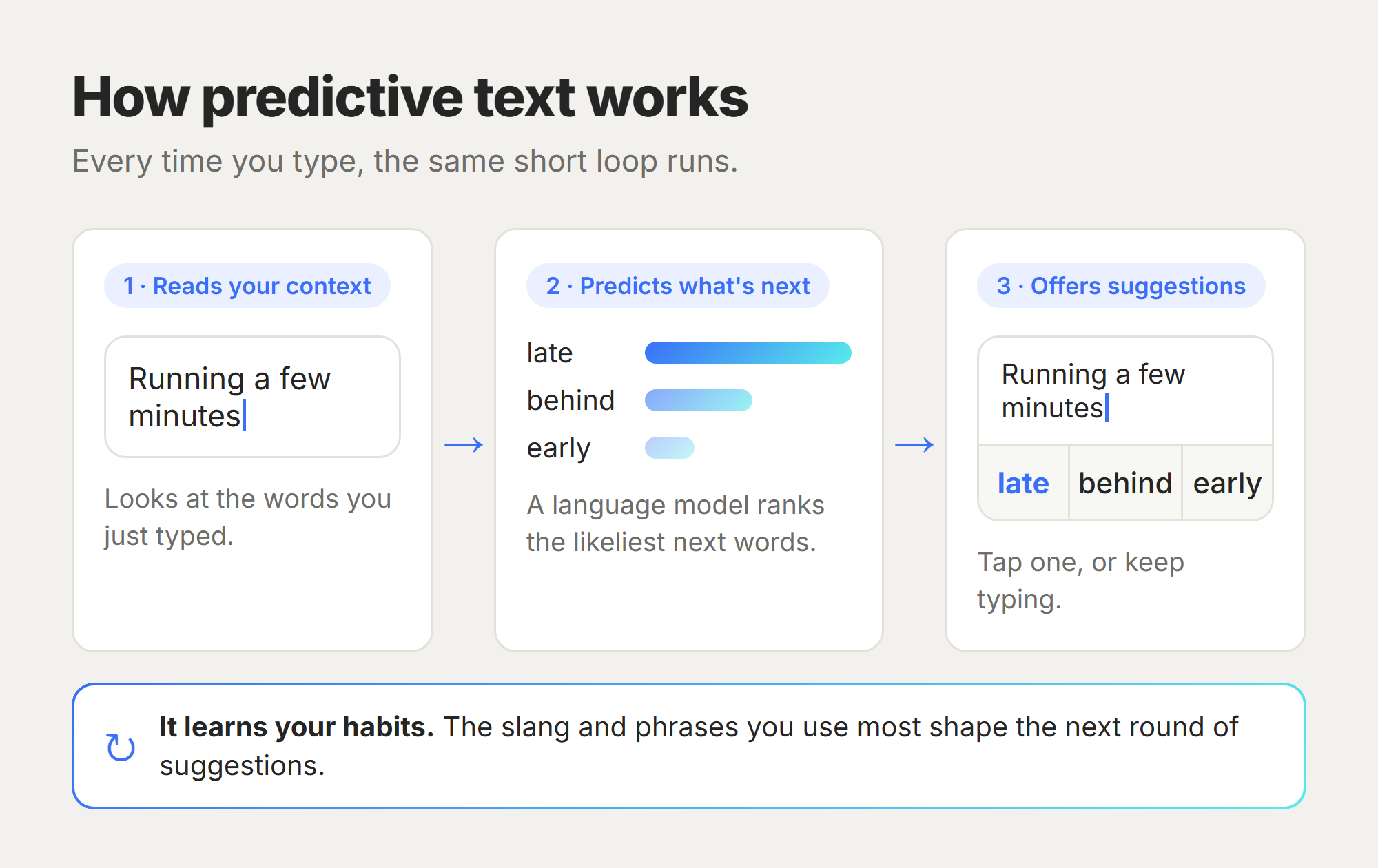
How good the guesses are depends on the model doing the predicting and how much of your own typing it has seen. The payoff is simple: fewer keystrokes, so you write a little faster and fix fewer mistakes.
From T9 to today
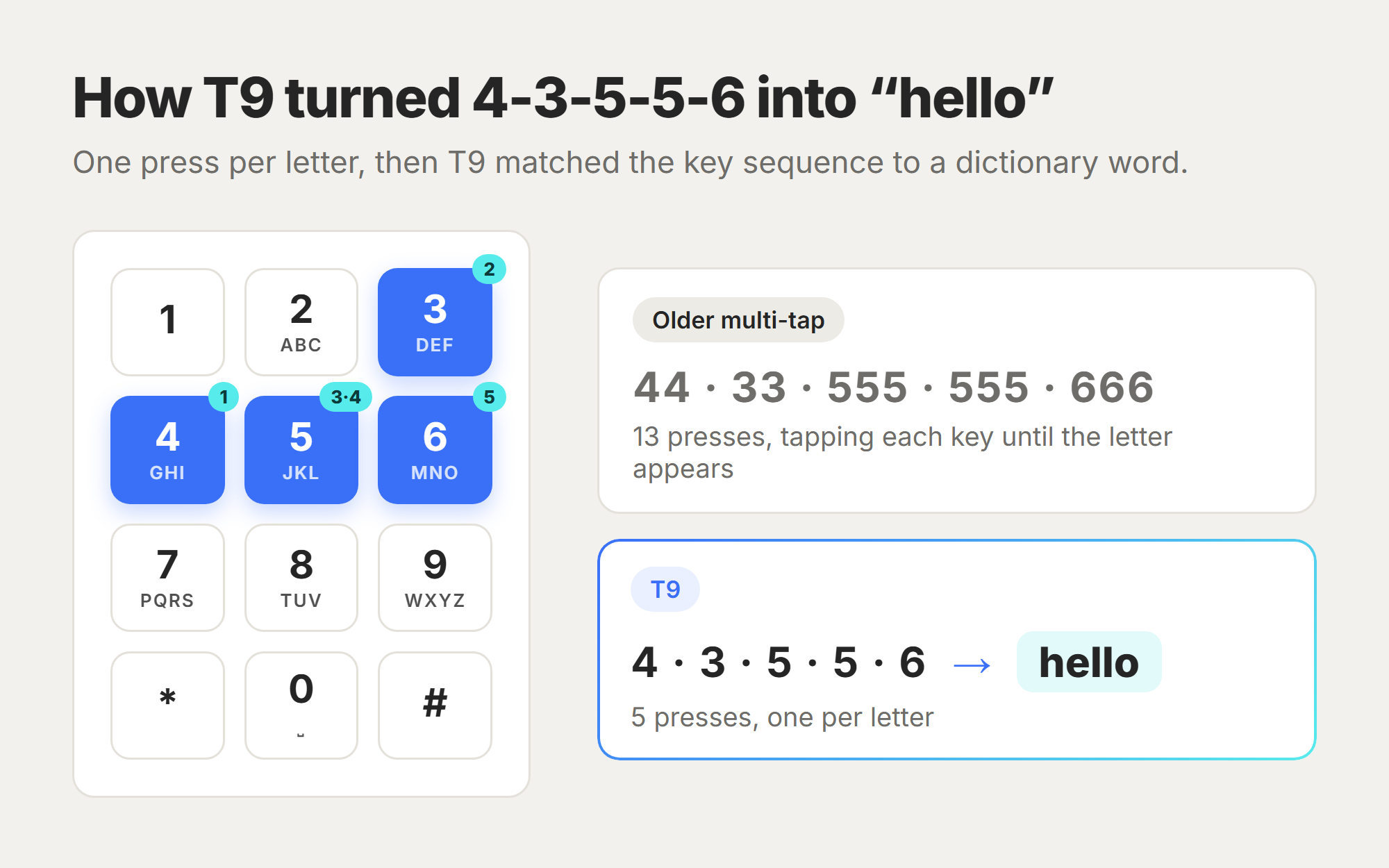
Predictive text goes back to old numeric phone keypads and a system called T9. It guessed words from the number sequence you pressed, so tapping 4-3-5-5-6 could spell "hello." Today's keyboards swapped that trick for machine-learning language models that read the context around each word.
Predictive text vs. autocorrect: what's the difference?
Predictive text suggests a word before you finish it, and you choose whether to tap it. Autocorrect changes a word you've already typed when it decides you made a mistake, usually without asking first.
People mix these two up constantly, and it doesn't help that most keyboards run both at once.
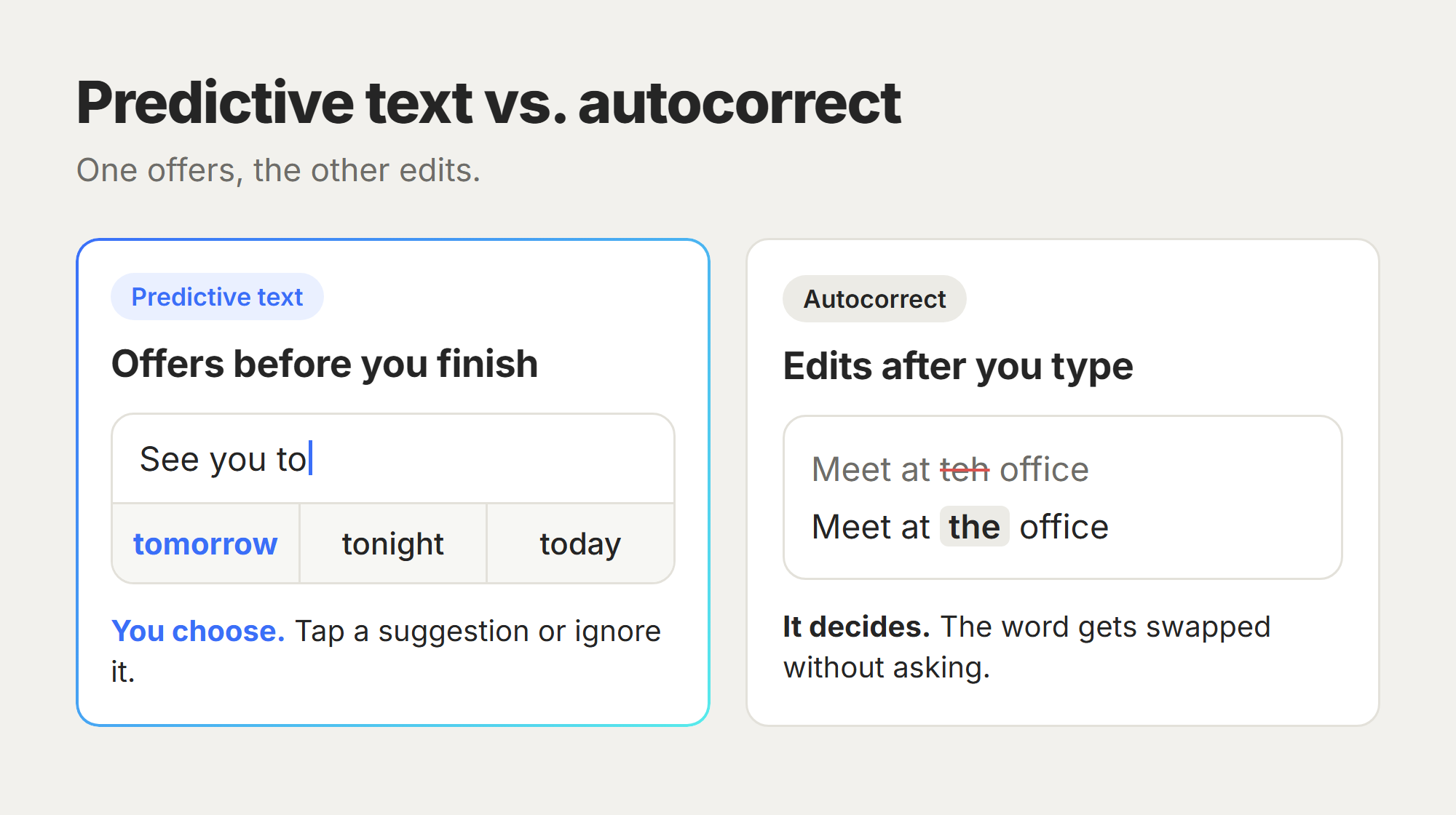
One offers, the other edits (which is how "ducking" ends up in your work emails).
How to turn predictive text on or off
Every major device lets you flip predictive text on or off in about a minute. Here's where the toggle lives.
On iPhone (iOS)
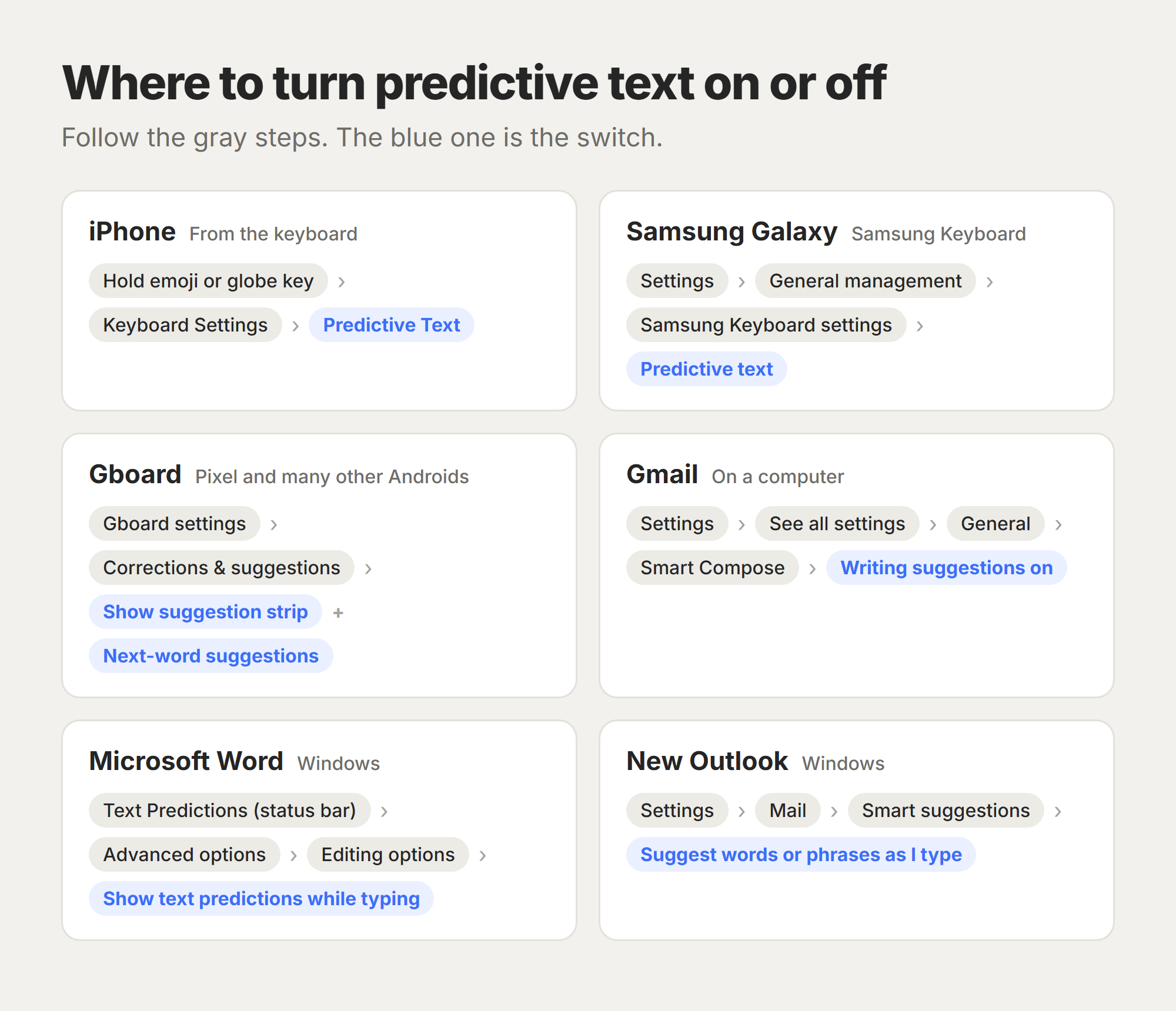
Open any app with the keyboard, then touch and hold the emoji or globe key. Tap Keyboard Settings, then turn Predictive Text on or off. Switching it off also stops the inline gray-text predictions, Apple notes. To hide only the gray text, turn off Show Predictions Inline instead.
On Android (Samsung)
Open Settings, tap General management, tap Samsung Keyboard settings, then tap Predictive text and flip the switch, per Samsung's support guide.
On Gboard (the default on Pixel and many other Androids), the same controls live under the keyboard's Corrections & suggestions settings (Text correction on older versions) as "Show suggestion strip" and "Next-word suggestions."
In Gmail (Smart Compose)
Gmail calls its version Smart Compose. Open Settings (the gear icon), click See all settings, and under the General tab, set Smart Compose to Writing suggestions on or off. It only works when Gmail's smart features are on. Accept a suggestion with the Tab key.
In Microsoft Word and Outlook (Text Predictions)
Since September 2026, Microsoft has been rolling out a change that turns text predictions off by default in Word and Outlook, so you may need to switch it on yourself.
As Microsoft's Word guide shows, clicking Text Predictions on the status bar at the bottom of the window opens the Advanced options panel. Check Show text predictions while typing under Editing options.
In new Outlook, go to Settings, then Mail, then Smart suggestions, and check Suggest words or phrases as I type under Text predictions, per Microsoft's Outlook guide.
Predictive text examples in everyday life
The three words above your phone keyboard are the example most people picture. Tap one, and it drops straight into your message.
In Gmail, and in Google Docs on work or school accounts, gray "ghost text" finishes your sentence before you do, and a tap of Tab accepts it. If your Docs account doesn't show it, there are AI typing assistants for Google Docs made for exactly that.
Predictive text shows up on desktops too. Tools like Cotypist add system-wide suggestions on a Mac, well beyond the phone keyboard the feature started on.
Does predictive text remember what you type?
Yes. Predictive text learns from what you type, so it keeps a personal dictionary of your most-used words. Some keyboards store that on your device, and others sync it to your account, so it's worth a look in your settings.
You can clear those learned words whenever you want:
- On iPhone: go to Settings, then General, then Transfer or Reset iPhone. Tap Reset, then Reset Keyboard Dictionary.
- On Samsung: in Samsung Keyboard settings, tap Reset to default settings, then Erase personalized predictions.
Is predictive text AI?
Short answer: the modern version is a simple form of AI. Today's predictive text runs on machine-learning language models, the same broad family of technology behind tools like ChatGPT, pointed at one small job of guessing your next word.
It's narrow AI, a long way from a tool that drafts a whole email from a prompt. That line between finishing your sentence and writing the whole thing is where newer AI writing tools come in.
How HyperWrite takes predictive text past the next word
Phone predictive text saves you a few keystrokes at a time. That adds up over a day, but it tops out at single words and short common phrases.
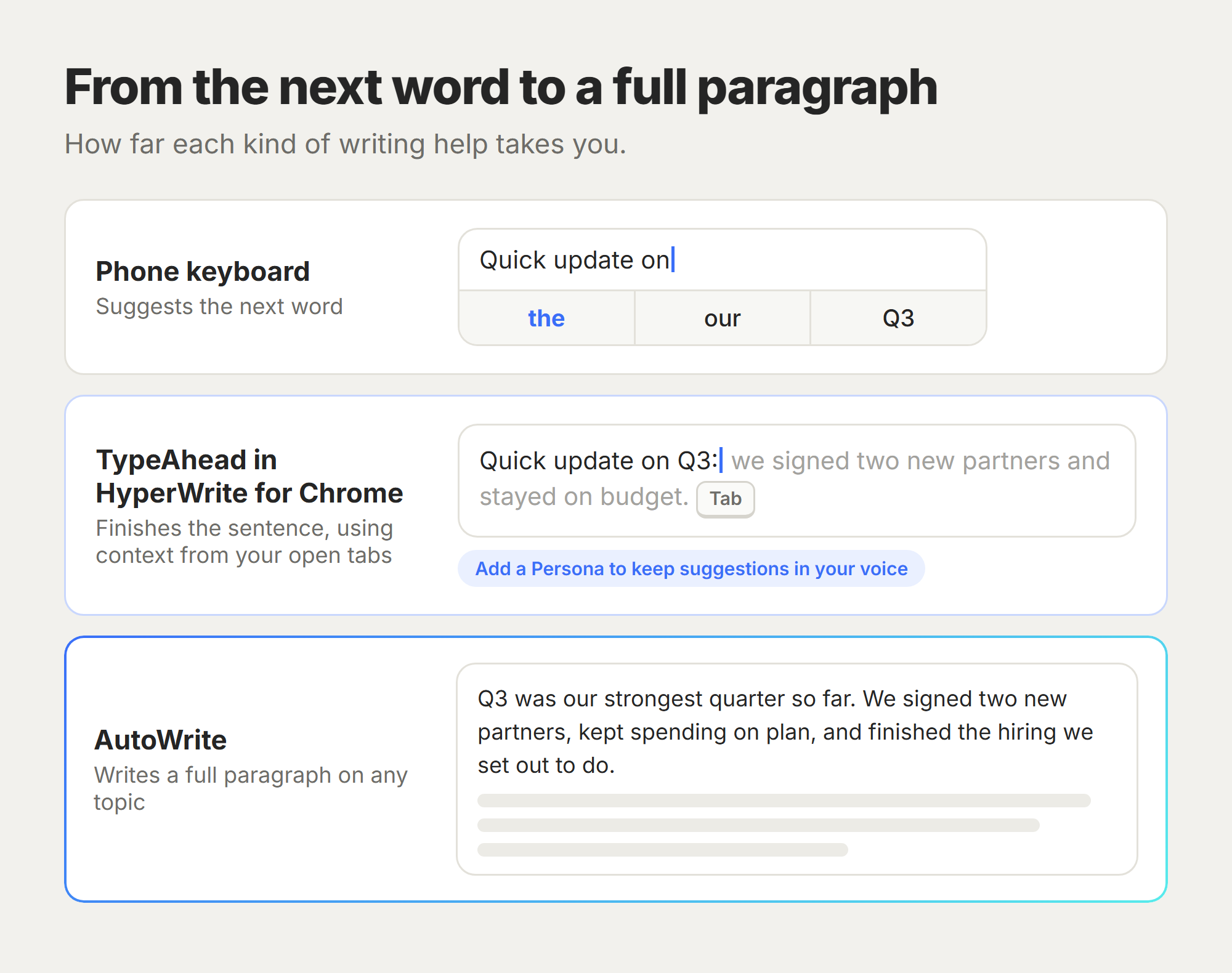
If you write all day across Gmail, Google Docs, a CRM, and a dozen open tabs, you want that help in every one of them. Professionals at Google, Netflix, LinkedIn, and Spotify use HyperWrite for exactly that. Here's what it adds:
- Finish the sentence: TypeAhead in HyperWrite for Chrome completes your sentences anywhere in Chrome, using context from your other open tabs.
- Keep your voice: set up a Persona, and those suggestions stay in your voice.
- Draft the whole thing: AutoWrite writes a full paragraph on any topic when a suggestion isn't enough.
Start writing free in HyperWrite on your next investor update, job description, or proposal.
Frequently asked questions
How do I do predictive text?
You turn predictive text on in your keyboard or app settings, then tap a suggested word as it appears. On iPhone, touch and hold the emoji or globe key, tap Keyboard Settings, and turn on Predictive Text. On Samsung, open Settings, then General management, then Samsung Keyboard settings. Tap Predictive text and turn the switch on.
What is predictive text on my iPhone?
Predictive text on your iPhone is the row of word suggestions above the keyboard, part of what Apple calls the QuickType keyboard. iOS predicts your next word from the sentence so far and your typing history, and you tap a suggestion to drop it into your message.
Is predictive text the same as autocorrect?
No, predictive text and autocorrect are not the same. Predictive text suggests your next word for you to accept, while autocorrect changes a word you already typed that it thinks is wrong. Most keyboards run both features together.
What is a predictive text example?
A common predictive text example is the three tappable words above your phone keyboard, or Gmail's Smart Compose finishing your sentence in gray text that you accept with the Tab key.
Can you turn predictive text off?
Yes, you can turn predictive text off in the same settings menu where you turned it on. On most phones, you can also clear the personalized dictionary it has learned from the way you type.
Powerful writing in seconds
Improve your existing writing or create high-quality content in seconds. From catchy headlines to persuasive emails, our tools are tailored to your unique needs.