LanguageTool Pricing 2026: Plans, Costs & Best Value
LanguageTool pricing explained: free vs Premium plans, what each billing interval really costs per month, team pricing, and what you still get for free.


You installed LanguageTool's browser extension, it quietly fixed your typos for free, and then one day it asked you to pay. That's the moment most people start Googling what LanguageTool actually costs.
Here's the short version: LanguageTool is still free to start, and Premium runs from about $4.99 to $24.90 a month depending on how long you're willing to commit up front.
I went through every plan and billing interval on LanguageTool's pricing page so you can skip the sales copy. If you landed here while weighing alternatives to Grammarly, the price math is the part worth getting right.
LanguageTool pricing at a glance
LanguageTool uses a freemium model: a free Basic tier, a paid Premium tier for individuals, a Teams tier for groups, and a separate Proofreading API for developers. Paid plans are billed by interval, so the "price" depends heavily on how long you sign up for.
| Plan | Starting price | Best for |
|---|---|---|
| Basic | Free | Casual writing that just needs solid spelling and grammar |
| Premium (Individual) | From $4.99/mo (2-year) up to $24.90/mo (monthly) | Professionals who want advanced style checks and the browser extension |
| Teams | $69.90 per user/year (2+ users) | Teams that want a shared style guide and dictionary |
| Proofreading API | From $49/mo (100 calls a day) | Developers adding grammar checks to an app or website |
Prices are from LanguageTool's official pricing page, checked in November 2026 and shown in USD including VAT.
How much does LanguageTool Premium cost? Billing intervals compared
LanguageTool Premium for individuals is one plan with four ways to pay for it: the features stay the same, and only the monthly cost and the length of the commitment change.
| 💳 Billing interval | 💵 Price charged | 📅 Effective monthly | 💰 Saved vs monthly |
|---|---|---|---|
| Monthly | $24.90 / month | $24.90 | 0% |
| Quarterly | $49.90 / quarter | $16.63 | ~33% |
| Annual | $69.90 / year | $5.83 | ~77% |
| 2-year | $119.80 / 2 years | $4.99 | ~80% |
The jump from monthly to annual is the big one. You go from $24.90 a month to $5.83 a month, which is roughly a 77% drop for committing to a year. The 2-year plan only shaves off a little more.
One caution: LanguageTool auto-renews at whatever interval you picked, and some of the complaints you'll find online are about unexpected charges, including being billed after canceling. Set a reminder before a long-term plan ends so a two-year plan doesn't quietly roll into another two years.
LanguageTool plans breakdown: what each tier includes
Basic: free
What's included: core spelling, grammar, and punctuation checks in 30+ languages in the web editor, plus a personal dictionary. You also get a limited "Picky Mode" and three AI sentence rephrases per day.
Best for: casual writers, students, and anyone who needs a reliable second pass on short pieces.
Pros: costs nothing and needs no install, so it works on any computer with a browser.
The catch: the free tier caps you at 2,000 characters per text field, and the official browser extension is no longer part of it (more on that below). Free users also get a steady stream of upgrade prompts.
Premium: $4.99 to $24.90 a month
What's included: everything in Basic, plus:
- 20,000+ extra style and grammar checks for English, German, French, Spanish, Dutch, Polish, and Portuguese
- A 150,000-character limit per text field
- Unlimited AI paraphrasing of your sentences
- A personal Style Guide for custom rules
- The browser add-on and the Windows, macOS, and iOS apps, now Premium-only
Best for: professionals who write all day and want real style help on top of spell-check. If you're also weighing other subscription editors, compare ProWritingAid's pricing.
Pros: the extra style checks cover seven languages, and a long-term plan cuts the cost to under $6 a month.
The catch: auto-renewal hits hardest here, since a long interval locks in the biggest single charge ($119.80 for two years).
Teams: $69.90 per user a year
What's included: all Premium features, plus:
- User management: invite and manage people by email
- Team Style Guide: shared rules so everyone writes the same way
- Team Dictionary: your company's names and jargon
Best for: marketing, support, or comms teams that want one consistent voice across writers.
Pros: you get the team features at no extra cost per person, since each seat is priced like an annual Premium plan.
The catch: you pay per seat, so a 10-person team pays $699 a year at list price.
LanguageTool for business, developers, and larger teams
Larger organizations usually land in one of three places:
Teams for departments, the Proofreading API for developers building grammar checks into their own product, and self-hosting for privacy-conscious or regulated companies that want full control.
Teams and the Proofreading API both list self-serve prices, so you can see the cost before you talk to anyone.
What you can still use for free (even after the extension change)
In December 2025, LanguageTool announced it was making its browser extension Premium-only, explaining that a small share of paying subscribers was covering server costs for a mostly free user base.
Extension users got a 14-day Premium trial before the switch. Plenty of LanguageTool is still free:
- The free web editor: spelling, grammar, and punctuation in 30+ languages on LanguageTool's website.
- The free API tier: the HTTP API gives you up to 20 requests per minute and 20,000 characters per request at no cost.
- Self-hosting: LanguageTool is open source, so you can run your own server for free, and the browser extension still works when it points at your instance.
Self-hosting isn't effortless, though. You're setting up and maintaining a server, and at least one self-hoster on the Privacy Guides forum reports memory leaks that can crash it. It's a real option for developers, less so for a non-technical writer who just wants the extension back.
Which LanguageTool plan should you choose?
Here's how I'd map the plans to actual people:
- Choose Basic (Free) if you: write short pieces, mostly need spelling and grammar, and can live without the browser extension.
- Choose Premium (Annual) if you: write for work every day and want the style checks and extension. The annual interval is the value sweet spot, so pick it over the 2-year plan unless you're sure you'll stay.
- Choose Teams if you: manage a group that needs one shared voice and dictionary across writers.
- Consider the Proofreading API or self-hosting if you: have strict privacy rules, high API volume, or a dev team that wants to build checking into another tool.
If your main job is paraphrasing, it's worth comparing QuillBot's pricing before you commit, since that's what QuillBot is built around.
Is LanguageTool worth the cost?
LanguageTool is one of the cheaper paid grammar checkers, and its multilingual coverage is a real edge over most competitors. But the value picture is mixed.
On Trustpilot, LanguageTool sits at about 1.8 out of 5 across 64 reviews. The recurring themes are billing and renewal problems, buggy apps, and accuracy misses in languages like Italian, Danish, and Spanish.
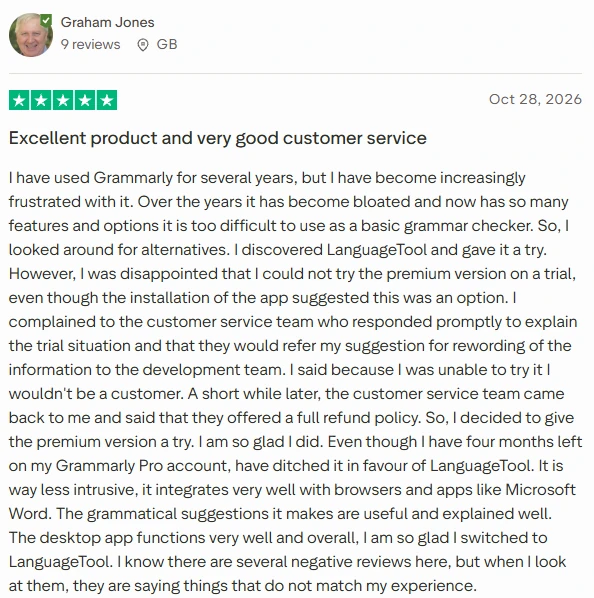
One reviewer who switched from Grammarly Pro told the opposite story: the app felt less intrusive, worked well with Microsoft Word, and support pointed them to the full refund policy, which convinced them to try Premium.
Here's what three other recent reviewers said:
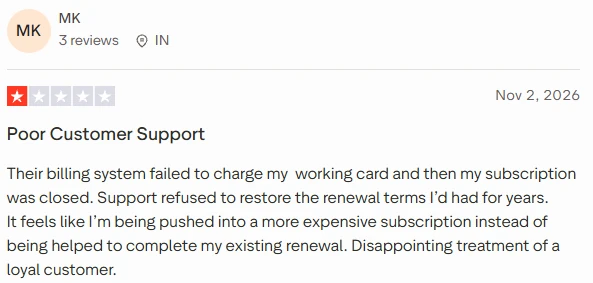
- Billing: after a failed card charge closed a long-time subscriber's plan, they wrote that they felt "pushed into a more expensive subscription instead of being helped to complete my existing renewal."
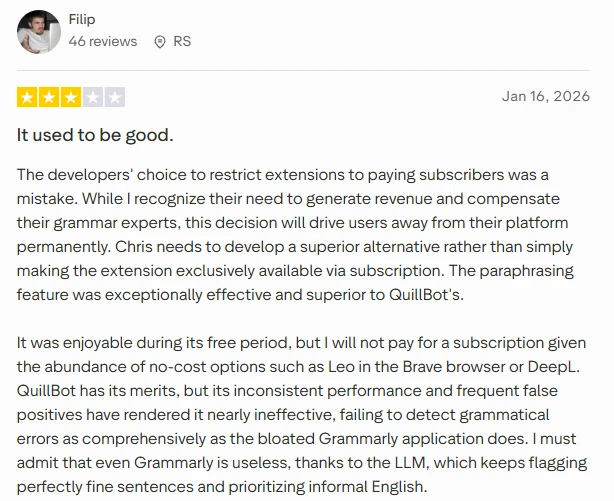
- The extension paywall: a 3-star reviewer called the paraphraser "exceptionally effective and superior to QuillBot's," but won't pay with so many free options around.
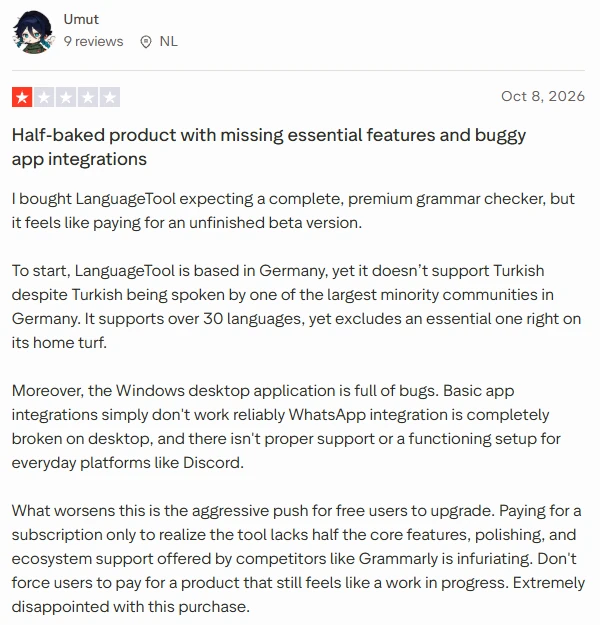
- App quality: a paying user said it "feels like paying for an unfinished beta version," pointing to a buggy Windows app and broken integrations.
It's worth it if you: write in more than one language, want style help beyond basic spell-check, and plan to pay annually so the effective cost drops to a few dollars a month.
Skip it if you: mostly need a free extension (Grammarly still offers one), write in a language LanguageTool handles weakly, or want hands-on support.
That's the LanguageTool pricing trade-off: low cost and wide language support, with some rough edges on billing and accuracy. For the full feature matchup, see how LanguageTool stacks up against Grammarly.
LanguageTool alternatives and pricing comparison
Here's how LanguageTool's annual price compares with other writing tools:
| Tool | Price, billed annually | Best for |
|---|---|---|
 LanguageTool |
$5.83/mo | Multilingual grammar and style checks |
 Grammarly |
$12/mo | Tone and clarity edits across the apps you already use |
 ProWritingAid |
$10/mo | Long-form writing and in-depth style reports |
 HyperWrite |
$16/mo | Drafting new content in your own voice |
Skip the blank page: draft with HyperWrite, then polish with LanguageTool
A grammar checker only earns its keep once the words already exist. LanguageTool, Grammarly, and tools like them have added some AI drafting, but they're built mainly to clean up writing you've done, so they help less with the slow part: getting the first draft out of your head.
That's the half HyperWrite covers. It takes professionals from a blank page to a solid draft, so by the time you open LanguageTool, there's real writing to polish. HyperWrite is used by people at Google, Netflix, LinkedIn, and Spotify.
With HyperWrite, professionals can:
- Draft emails, reports, and documents in any format with AutoWrite.
- Keep their own voice with Personas instead of generic AI phrasing.
- Get answers faster than ChatGPT-style thinking models with the writing-optimized AI Writing Assistant.
- Write across the browser with context-aware autocomplete in HyperWrite for Chrome.
Pair a drafting tool with an editing tool and the whole workflow speeds up: you write faster, then you clean up faster.
Start your next report or proposal free in HyperWrite's AI Document Editor and see how much quicker the first draft comes together before you ever open a grammar checker.
Frequently asked questions
Is there a cheaper alternative to Grammarly?
Yes, LanguageTool is often the cheaper option, and it covers more languages. Paid annually, it works out to about $5.83 a month, less than half of Grammarly Pro's annual rate of $12 a month. You can compare the numbers directly against Grammarly's pricing.
Is the LanguageTool API free?
Yes, LanguageTool has a free API tier. It allows up to 20 requests per minute and 20,000 characters per request. Developers who need more can move to the paid Proofreading API, which accepts up to 60,000 characters at a time. LanguageTool asks people not to send automated requests to the free tier.
Is there a LanguageTool lifetime deal?
No, LanguageTool does not currently offer a lifetime deal. It's a subscription billed monthly, quarterly, annually, or every two years, though the free tier and self-hosting give you no-cost options if you'd rather not subscribe.
Can I still use LanguageTool for free after the extension change?
Yes, you can still use LanguageTool for free. The web editor on LanguageTool's website, the free API tier, and self-hosting all remain free. The browser extension and the Windows, macOS, and iOS apps are now Premium features, though the extension still works if you point it at your own self-hosted server.
Does LanguageTool offer a free trial or refund?
LanguageTool doesn't offer a standard free trial of Premium (the 14-day trial only went to extension users at the switch), but every Premium package comes with a 14-day money-back guarantee. You can cancel any time, and the subscription ends at the close of your current billing period.
Powerful writing in seconds
Improve your existing writing or create high-quality content in seconds. From catchy headlines to persuasive emails, our tools are tailored to your unique needs.