
LanguageTool vs Grammarly: Which Is Better for Writers?


Ask this before you buy either one: does your writing need to leave your computer? That's the real question behind LanguageTool vs Grammarly.
Grammarly catches more in English. LanguageTool checks 30-plus languages, costs a third as much, and can run entirely on your own hardware. The right pick depends on your language, your budget, and your data policy more than which one flags an extra comma.
LanguageTool vs Grammarly: What's the difference?
LanguageTool is an open-core grammar and style checker from a German company, supporting 30-plus languages, with a free engine you can self-host and a proprietary Premium layer on top.
Grammarly is a proprietary, cloud-based writing assistant for English, combining grammar and style correction with tone feedback, plagiarism checking, and generative drafting.
Choose LanguageTool if you write in more than one language, work under data rules that restrict US cloud services, or want the lowest price available.
Choose Grammarly if you write in English, want the strongest error detection on the market, and need drafting and tone tools in the same place.
Meet LanguageTool
LanguageTool is an open-core grammar checker built for writers who work across languages. It checks 30-plus languages in one tool, and its core engine is published on GitHub under the LGPL-2.1 license, so you can self-host it and keep text off anyone else's servers. The trade-off is a lighter touch, since it flags less and offers narrower generative features.
Meet Grammarly
Grammarly is the most widely used English writing assistant, and it has moved well past proofreading into tone feedback, plagiarism checking, and generative drafting. It runs almost everywhere you write, from browsers to email to mobile keyboards. The downsides are language and location, since it checks English only and processes through its US cloud.
LanguageTool vs Grammarly: At a glance
Pricing based on annual billing; verified September 2026.
LanguageTool vs Grammarly: Feature-by-feature comparison
Accuracy and error detection
LanguageTool catches typos, agreement errors, and punctuation reliably, and Picky mode surfaces more style issues when you want them. It's conservative by design, flagging less and interrupting less, which some writers prefer. On complex sentence-level clarity, it suggests less than Grammarly does.
Grammarly goes deeper into clarity, conciseness, and sentence restructuring. It flags writing that's grammatically correct but hard to follow, which is a different capability from spotting errors. That depth is also why some writers find it intrusive.
Winner: Grammarly, for English writing specifically.
Language support
LanguageTool checks more than 30 languages in a single tool, with the strongest coverage in German, French, Spanish, Dutch, Polish, and Portuguese. For anyone writing across languages, or a team spanning several, that's the whole comparison.
Grammarly checks English only. It handles English dialects well, covering American, British, Canadian, and Australian conventions, but a writer working in Spanish or German gets nothing from it.
Winner: LanguageTool, decisively.
Privacy and data handling
LanguageTool is a German company subject to GDPR, and its hosted service processes text on EU servers. Self-hosting the open-source core removes the question entirely, since nothing leaves your infrastructure.
Grammarly processes everything through its US cloud by design, which is what enables its real-time coverage everywhere you write. It publishes enterprise security certifications and offers admin controls at the business tier. The company's handling of it is well documented.
Winner: LanguageTool, especially for legal, healthcare, and government teams.
Generative and tone features
Grammarly drafts, rewrites, adjusts tone on request, and checks plagiarism on paid plans. If you want one tool that both corrects your writing and helps produce it, that's the argument for paying more.
LanguageTool has added AI paraphrasing and rewriting, though the generative side stays narrower. It's built around checking what you wrote instead of producing new text.
Winner: Grammarly, by a clear margin.
Pricing and value
LanguageTool offers a free tier capped at 2,000 characters per check. Premium runs $24.90 month-to-month, $49.90 quarterly (roughly $16.63 a month), $69.90 annually (roughly $5.83 a month), or $119.80 for two years (roughly $4.99 a month).
Grammarly has a free plan with 100 AI prompts a month. Pro runs $12 a month billed annually, $20 quarterly, or $30 month-to-month, with custom enterprise pricing. Our Grammarly pricing breakdown covers every tier.
Winner: LanguageTool. On annual billing, LanguageTool costs roughly a third of Grammarly.
Integrations and platform coverage
Grammarly runs almost everywhere: browsers, desktop apps, mobile keyboards, email clients, and most web-based editors, all syncing through one account.
LanguageTool covers the major browsers, Word, LibreOffice, and desktop apps for Windows and macOS. Solid coverage, though narrower than Grammarly's reach.
Winner: Grammarly.
What real users are saying
LanguageTool
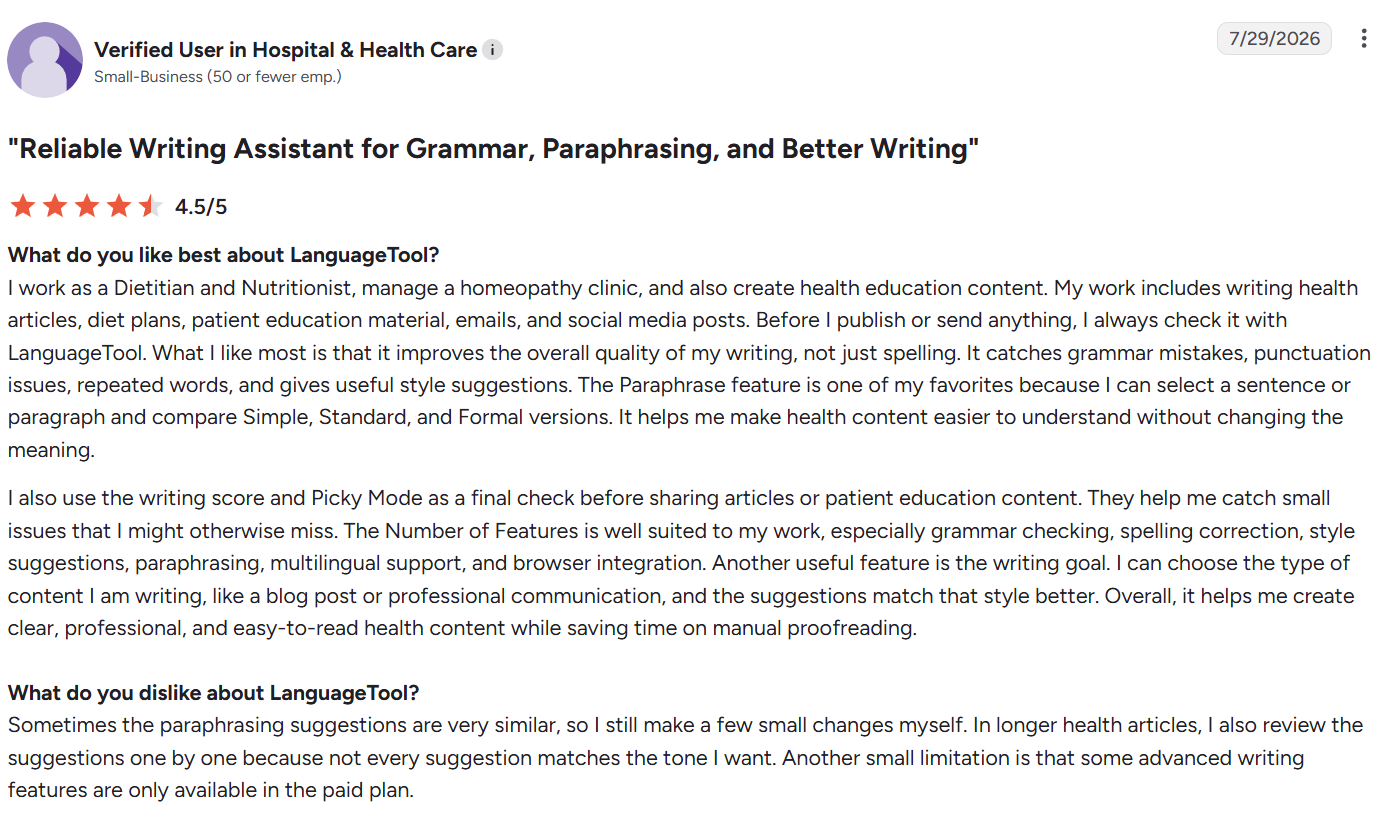
Pros
✅ Compare tone side by side. You can test how a passage reads across different registers before choosing one. “I can select a sentence or paragraph and compare Simple, Standard, and Formal versions.” — Verified user, G2
✅ The suggestions actually make sense. The corrections read as useful and strengthen the writing overall. “The suggestions are super smart and actually make sense.” — Fatih, Trustpilot
✅ Nothing gets in your way visually. The interface stays out of your workspace and doesn’t have any hovering buttons that clutter workspaces. “I've never had to try and have any widget or icon moved because it was in the way.” — Zak A., support worker, Capterra
Cons
❌ The free Chrome extension is gone. A feature that used to be free now sits behind a paywall. “They ended Chrome extension usage for free users.” — Johnathan K., CEO in design business, Capterra
❌ No support for Google Sheets. LanguageTool's coverage stops at standard documents and browsers, leaving data-heavy tools like Sheets out entirely. “LanguageTool doesn't work in Google Sheets.” — Ana Luz A., G2
❌ Auto-renewal is the default. The subscription rolls over automatically unless you cancel before the cycle ends. “Beware of the automatic renewal if you subscribe!” — Camille Solange, Trustpilot
Grammarly
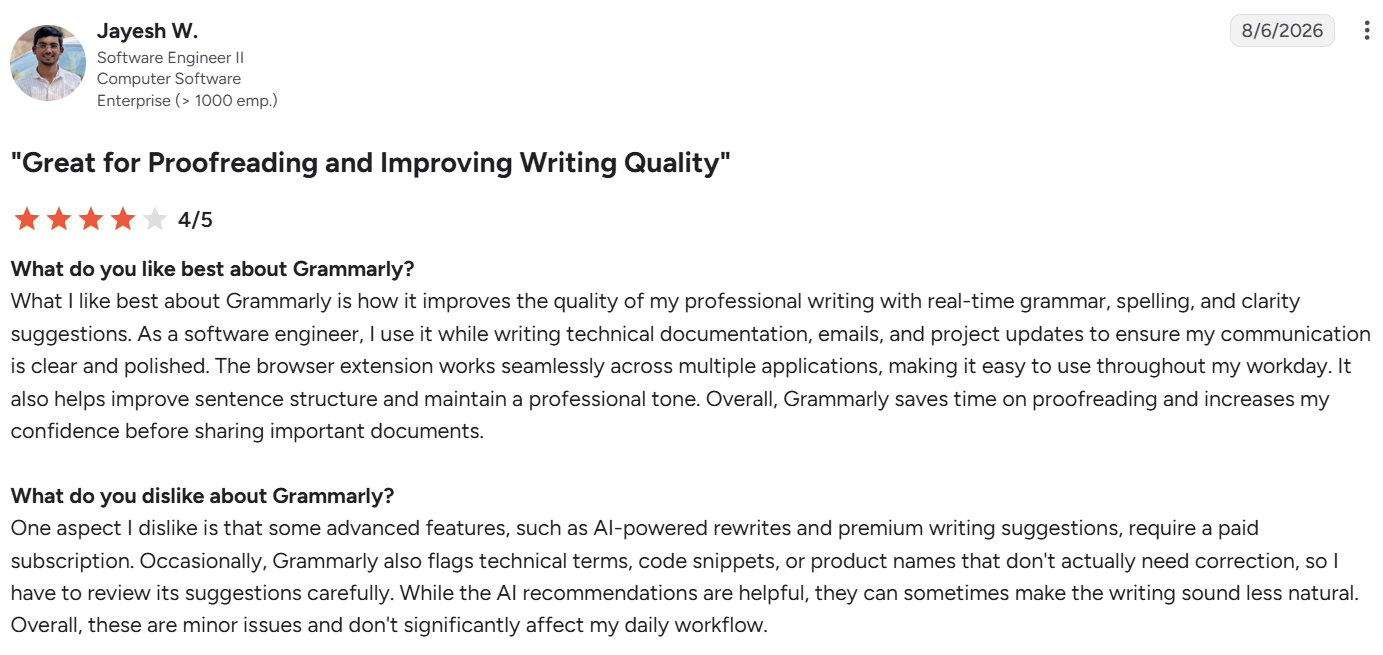
Pros
✅ It runs everywhere you write. Grammarly works across your entire digital workspace through a browser extension that moves with you from app to app. “Browser extension works seamlessly across multiple applications.” — Jayesh W., software engineer II, G2
✅ The basics are handled well. Grammar and sentence structure improve without extra effort on the writer's part. “It helps me correct grammar, improve sentence structure.” — Manpreet K., Physiotherapist, Capterra
✅ AI has raised the ceiling. The generative additions do more than fix mistakes; users describe them as making already-decent writing measurably better. “I think the addition of AI is just going to make my writing even better.” — Heartland B., small business marketing director, G2
Cons
❌ Unnecessary suggestions. Suggestions built for formal prose don't always fit casual or creative work. “Grammarly suggestions can feel unnecessary, especially when I’m writing in a casual or creative style.” — Vicky S., content creator, G2
❌ Priced above what the value feels like. Even users who rate the tool positively push back on the cost. “Casual users may find the subscription expensive.” — Sachin P., G2
We dug deeper into what Grammarly users flag as wins and dealbreakers in our Grammarly review.
How to make your choice
The choice depends on what your writing looks like. Grammarly wins for English-only writers who want the deepest error detection available; LanguageTool wins for anyone writing across languages, working under strict data rules, or watching what the tool costs.
LanguageTool is better for:
- Multilingual writers working across more than one language.
- Legal, healthcare, and government teams under strict data rules.
- Anyone wanting to self-host on their own infrastructure.
- Budget-conscious writers who need solid mechanical accuracy.
- Writers who find Grammarly's suggestions intrusive.
Grammarly is better for:
- English writers who want the strongest error detection available.
- Anyone needing tone, clarity, and conciseness feedback.
- Students and academics who need plagiarism checking.
- Writers who want drafting and correcting in one tool.
- Teams wanting coverage across every app they write in.
If neither quite fits, our Grammarly alternatives list covers the wider field, and ProWritingAid vs Grammarly covers the deeper style-report option.
The final verdict
Grammarly is aggressive. It flags more and suggests more than LanguageTool does, to the point that some writers turn features off within a week just to get through a paragraph. LanguageTool leaves you alone more often, and costs less doing it. Which of those two behaviors suits you comes down to how you write.
Both share a bigger limitation. They only work on writing that already exists, and neither has anything to offer the writer staring at a blank document. That's still the hardest part of the job for most people.
HyperWrite is what happens before either checker gets involved. It writes the draft you'll hand to LanguageTool or Grammarly for the polish.
This Wordtune vs Grammarly vs HyperWrite comparison goes deeper on how a drafting tool and a checker work together.
Draft in your own voice, then check it
HyperWrite is the writing co-pilot for that earlier moment. Its TypeAhead lives in the browser and writes with you as you go, pulling context from your other open tabs and your personalization data so the completions read like your own sentences.
AutoWrite turns a rough idea into a full first pass. The AI Document Editor holds longer pieces as they take shape, and the AI Writing Assistant drafts from a prompt when you're starting from a blank page.
Personas runs under all of it, so whether you're finishing a Gmail reply with TypeAhead or drafting a full piece in the editor, the voice on the page stays yours.
Ready to skip the slow first draft? Try TypeAhead free with the HyperWrite Chrome extension and see how it writes alongside you in every browser tab.
Frequently asked questions
Is LanguageTool better than Grammarly?
The main difference between LanguageTool and Grammarly is scope. LanguageTool is better for multilingual writing, privacy, and price, supporting 30-plus languages and self-hosting. Grammarly is better for English error detection, catching more and adding tone feedback and generative drafting.
Is LanguageTool really open source?
LanguageTool is partly open source. Its core engine is published under the LGPL-2.1 license and can be self-hosted at no cost, while LanguageTool Premium is proprietary software layered on top of that core.
Is LanguageTool's free version good enough?
Yes, LanguageTool's free version is good enough for most everyday writing. It checks up to 2,000 characters at a time and covers spelling, grammar, and punctuation across every supported language. Premium raises that ceiling to 150,000 characters per field, which is the reason most people upgrade.
Which is cheaper, LanguageTool or Grammarly?
LanguageTool is significantly cheaper than Grammarly. Its annual plan works out to roughly $5.83 per month, compared with Grammarly Pro’s $12 per month billed annually. Self-hosting the open-source core costs nothing beyond the server you run it on.
Can LanguageTool replace Grammarly?
Yes, LanguageTool can replace Grammarly for multilingual writers, privacy-sensitive teams, and budget-conscious writers. It covers less ground for English writers who rely on Grammarly's tone feedback, clarity rewrites, or plagiarism checking.
Does Grammarly support other languages?
No, Grammarly doesn’t support other languages. It supports English only, covering American, British, Canadian, and Australian conventions. Writers working in Spanish, German, French, or any other language need LanguageTool or a similar multilingual checker.

HyperWrite is the AI writing assistant that learns your style. It handles drafting, editing, and researching so you can focus on ideas.
- Autocompletes sentences as you type
- Works inside Google Docs & Gmail
- Adapts to your personal writing style
- 500+ AI tools for any writing task

Powerful writing in seconds
Improve your existing writing or create high-quality content in seconds. From catchy headlines to persuasive emails, our tools are tailored to your unique needs.