
Grammarly vs Copilot vs HyperWrite: Which Writing Tool Actually Fits Your Work?


The wrong tool for your workflow means paying for something you work around. Grammarly, Copilot, and HyperWrite each solve a different problem; here's which one actually matches how you write.
Grammarly vs Microsoft Copilot vs HyperWrite: At a glance
Pricing based on annual billing, verified from official vendor pages as of May 2026.
Choose Grammarly if you write professionally, where errors cost you credibility, and you want a reliable editor that catches what you miss before you hit send.
Choose Microsoft Copilot if your team runs on Microsoft 365 and you spend most of your day in Word, Excel, Outlook, or Teams.
Choose HyperWrite if you're a founder, marketer, recruiter, or executive writing across Gmail, Docs, LinkedIn, and a CRM all day, and you need AI that stays inside the tab you're already in.
Meet the contenders
Grammarly: When you already know what you want to say
If your draft is mostly there and you just need it cleaner before it goes out, Grammarly is the most reliable option. It catches grammar slips, tightens awkward phrasing, and flags tone issues across most apps you write in.
Grammarly used to ship a predictive-typing feature too, but they deprecated it and now focus squarely on editing after the draft exists. That's still where it's strongest: client emails, proposals, and anything where a small mistake costs you credibility.
Microsoft Copilot: When your team already runs on Microsoft 365
If most of your day is spent in Word, Outlook, Teams, and Excel, Microsoft Copilot fits without forcing a workflow change. It turns meetings into summaries, notes into drafts, and rough prompts into structured documents. The strength is location: you're getting an assistant inside the tools you already pay for.
HyperWrite: When you write across tabs all day
If you're a founder, marketer, recruiter, or executive whose workday operates in Gmail, Docs, LinkedIn, and a CRM, HyperWrite is built for that pattern. TypeAhead writes alongside you in whatever tab you're in, and Personas learns your past writing so suggestions sound like you.
Grammarly vs Microsoft Copilot vs HyperWrite: Feature breakdown
Catching errors before you hit send
Grammarly: Grammarly catches typos, subject-verb errors, and awkward phrasing as you write, with clear explanations behind each suggestion. The free plan covers more ground than most paid tools for this specific job. For client emails, proposals, and investor updates where a small mistake costs credibility, it's still the most reliable option here.
Microsoft Copilot: Copilot relies on Word's built-in editor for grammar and spelling, layered with AI rewrite suggestions. It catches the basics but doesn't go as deep as Grammarly on tone, clarity, or style.
HyperWrite: HyperWrite catches simple grammar issues while generating text, but it doesn't review full drafts line by line. You'll still want a dedicated editor if polish is your priority.
Winner: Grammarly. For high-stakes communication where errors damage credibility, it's the safest choice.
Writing that sounds like you, not a tool
Grammarly: Grammarly steers tone through preset registers (confident, formal, friendly) and brand tones for teams. It keeps writing consistent, but it's pushing toward an approved tone instead of learning yours. Most users flag this directly: rewrites tend to flatten personal voice.
Microsoft Copilot: Copilot can follow style instructions if you prompt them well, but voice doesn't persist across sessions. Every prompt starts fresh. The output sounds competent but impersonal, especially in first drafts.
HyperWrite: Personas let you create custom voice profiles that learn from your past writing, so output starts to match your phrasing, sentence length, and word choice over time. Different Personas can hold different voices: one for client emails, another for LinkedIn posts, another for internal updates.
Winner: HyperWrite. Best for sounding like a specific person, which is what most individual professionals actually want.
Cross-platform reach for browser-based work
Grammarly: Grammarly runs across more apps than the other two: browsers, desktop, mobile, and most major writing surfaces. Reach is its strength. The limitation is depth: it's present everywhere, but it doesn't read what's around it. Grammarly tested predictive typing in the past and pulled it, choosing to double down on the editing layer instead.
Microsoft Copilot: Copilot lives inside Word, Outlook, Teams, PowerPoint, Excel, and Loop. For teams whose work happens entirely in Microsoft 365, that's everywhere they need it. Step outside the ecosystem and the value drops fast.
HyperWrite: TypeAhead in the Chrome extension keeps HyperWrite present inside any browser-based text field. For founders, marketers, recruiters, and executives whose workday spans tabs rather than a single suite, it meets the work where it actually happens.
Winner: HyperWrite. Works well where professionals are actually drafting (Gmail, Docs, LinkedIn, CRM).
Working with the context around your writing
Grammarly: Grammarly reads the sentence in front of you well, but it doesn't pull context from anywhere else. You're getting a sentence-level editor, not a writing partner that knows your project.
Microsoft Copilot: Copilot has the deepest native access to enterprise context: emails, meetings, files, and organizational data inside Microsoft 365. A senior leader can ask Copilot to draft an investor update using last quarter's actual financials from Excel, or summarize a Teams meeting they missed. That's a context advantage the others can't match.
HyperWrite: Its TypeAhead pulls context from the browser tabs around you, so a draft in one tab can inform suggestions in another. Useful for cross-tab work like writing a follow-up email based on a LinkedIn profile you're viewing. It doesn't have access to enterprise files or meeting transcripts.
Winner: Microsoft Copilot. When the context that matters lives in your company's Microsoft 365 data, Copilot is the only one of the three that can pull from it.
Team rollout and enterprise readiness
Grammarly: Grammarly has a stronger team-control angle than most buyers realize. Brand tones, style guides, and business deployment features make it useful for teams that care about consistent communication at scale. The limitation is that it's still a writing layer, not a full collaboration platform.
Microsoft Copilot: Copilot is built for organizations standardizing around Microsoft. Admin controls, enterprise security, SSO, compliance certifications, and native deployment inside shared workplace tools make it the most natural team-wide rollout here. The limitation is cost and licensing complexity at scale.
HyperWrite: HyperWrite is strongest as an individual productivity tool. Personas are tied to individual accounts, and there's no team-level admin or governance built in.
Winner: Microsoft Copilot. For large teams already inside Microsoft 365, Copilot fits the existing stack with the least organizational issues.
What real users say
Grammarly
Pros:
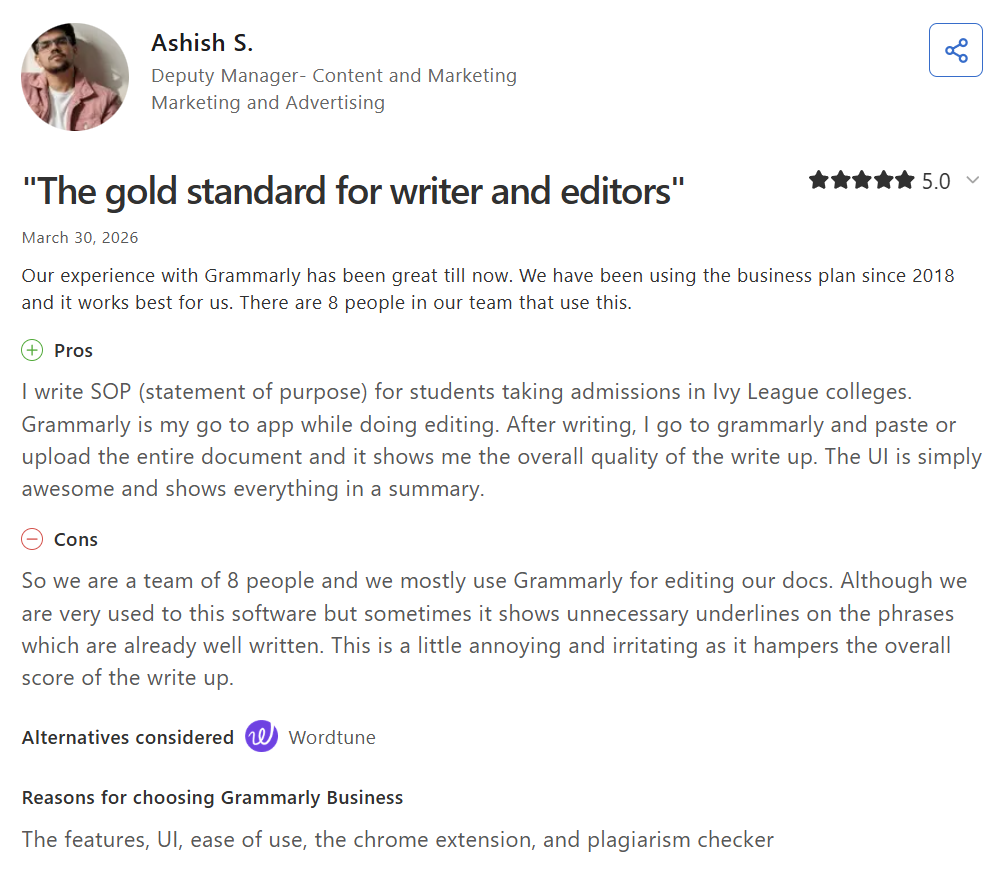
Ashish S., a deputy manager in content and marketing whose 8-person team has used Grammarly Business since 2018, shares on Capterra that the tool is the team's go-to for editing because the UI "is simply awesome and shows everything in a summary."
Other reviews point to the value of the free plan, which covers grammar, spelling, and basic tone before any upgrade.
Cons:
The most consistent complaint across both platforms is overcorrection. Users note that Grammarly sometimes flags phrases that are already well written, which can pull down the document's overall score.
Other reviewers add that AI-driven rewrites can feel rigid for creative or voice-driven writing, often pushing toward a more polished default that strips personal style. Shristi M., a manager in business supplies and equipment, echoes this from a daily-use angle: "Sometimes the suggestions feel repetitive or not fully aligned with the intended tone."
Microsoft Copilot

Pros:
Reviewers consistently praise Copilot's depth and reliability across daily work. Lauren Charleson, Director of Communications in Marketing at Weidner Apartment Homes, notes in TrustRadius that Copilot is “great at saving time when you leverage its summarization tools.”
Others highlight the depth of responses, often backed by references, and the time savings on repetitive drafting and research.
Cons:
Users mention that Copilot can struggle with open-ended requests and could benefit from clearer follow-up. Akshit J., a senior software engineer in legal services, notes on G2 that "the response can sometimes feel a bit generic, especially if the input is not very detailed."
HyperWrite
Pros:
Reviewers in marketing, operations, and executive roles highlight that TypeAhead saves time without pulling them out of their workflow.
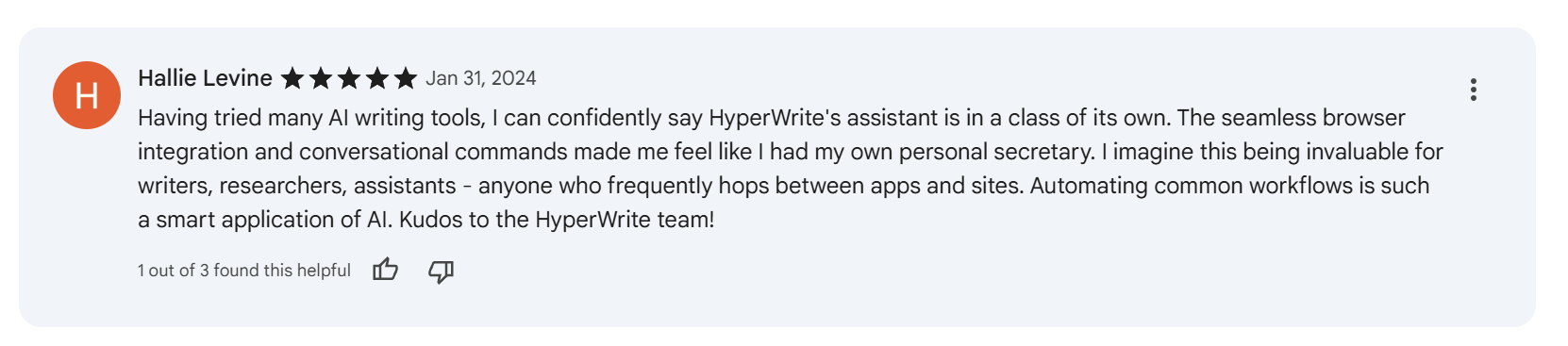
Hallie Levine, a reviewer on the Chrome Web Store, says the “browser integration and conversational commands made me feel like I had my own personal secretary.” This is especially valuable for anyone who frequently switches between apps and sites.
Cons:
Divyesh on Chrome Web Store flags pricing and credit limits as the main barrier, noting that the trial plan can run out of credits before users finish a single task. Other reviewers add that long-form content quality becomes inconsistent in longer pieces, which limits HyperWrite's fit for blog-length writing.
Which tool should you choose?
The best choice depends on where your writing happens and what kind of help you need.
Choose HyperWrite if you:
- Write across Gmail, Google Docs, LinkedIn, and browser-based tools most of the day.
- Want help while you write, not only after you finish a draft.
- Need AI suggestions that sound closer to your voice than a generic “professional” default.
Choose Grammarly if you:
- Need strong grammar, clarity, and tone correction across many apps.
- Already know what you want to say, and mainly want to send cleaner writing.
- Care more about polish than real-time drafting support.
Choose Microsoft Copilot if you:
- Work inside Microsoft 365 apps for most of your day.
- Need help turning notes, meetings, and prompts into structured drafts.
- Are buying for a team that already pays for the Microsoft ecosystem.
The honest verdict
If your day runs through Word, Outlook, and Teams with internal data behind every draft, Microsoft Copilot is the strongest pick. Nothing else can pull Excel financials into an investor update or summarize a Teams meeting you missed.
If you mostly need to clean writing before it goes out (client emails, proposals, anything where a typo costs credibility), Grammarly is the safest editing layer. It has a free plan, the broadest app coverage, and the most reliable correction layer of the three.
The strongest setup for many professionals is actually both: HyperWrite handling the drafting, Grammarly handling the polish.
Ready to try HyperWrite?
If your day looks like 30 emails between meetings, LinkedIn outreach, and a CRM open in a third tab, which describes most founders, marketers, recruiters, and executives, HyperWrite is the only one of the three built for that pattern. TypeAhead writes inside the tab you're in, Personas keeps the output sounding like you.
Stack Grammarly on top for the final read-through if you want, but the drafting layer is where HyperWrite earns its place.
The fastest way to know whether HyperWrite fits your workflow is to use it on a real workday. Install the Chrome extension, then spend a morning replying to emails, writing LinkedIn messages, and drafting docs the way you normally would.
Frequently asked questions
What is the main difference between Grammarly, Microsoft Copilot, and HyperWrite?
The main difference between Grammarly, Microsoft Copilot, and HyperWrite is the job each one handles best. Grammarly edits and polishes writing, Microsoft Copilot drafts inside Microsoft 365, and HyperWrite helps you write faster across browser-based workflows.
Is HyperWrite better than Grammarly?
HyperWrite is better than Grammarly for people who want help during the act of writing, especially across browser tabs. Grammarly is better if your main need is correction, clarity, and tone control after words are already on the page.
Do I need Microsoft 365 to use Copilot?
For personal use, Copilot is included with Microsoft 365 Personal from $9.99/month. For business use, it requires a qualifying Microsoft 365 business subscription plus a Copilot add-on. A free version also exists at copilot.microsoft.com, but with no integration with Microsoft 365 apps. See current pricing on Microsoft's site.
Is HyperWrite free to use?
Yes, HyperWrite has a free plan that lets you try the core writing tools before committing. TypeAhead, Personas, and citations unlock on paid plans, starting at $16/month billed annually.

HyperWrite is the AI writing assistant that learns your style. It handles drafting, editing, and researching so you can focus on ideas.
- Autocompletes sentences as you type
- Works inside Google Docs & Gmail
- Adapts to your personal writing style
- 500+ AI tools for any writing task

Powerful writing in seconds
Improve your existing writing or create high-quality content in seconds. From catchy headlines to persuasive emails, our tools are tailored to your unique needs.