
Sudowrite Pricing 2026: Plans & Credit Costs Compared


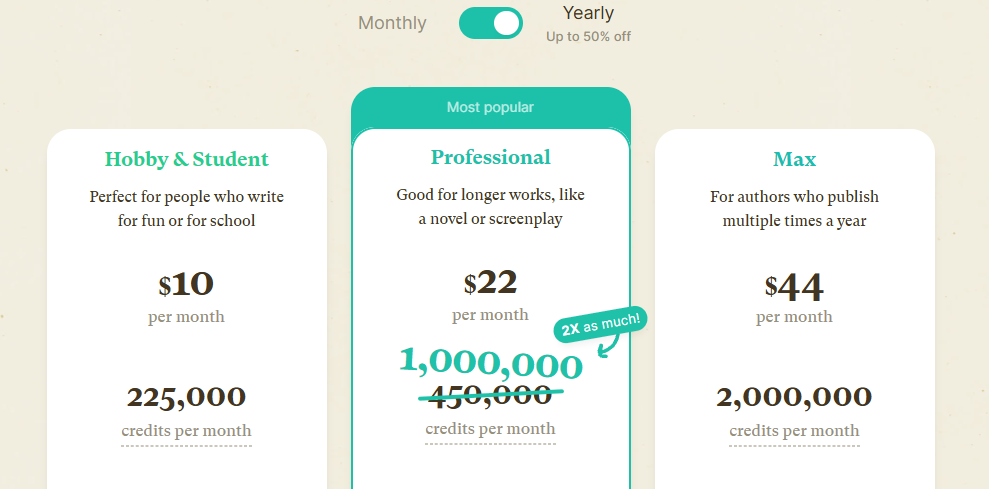
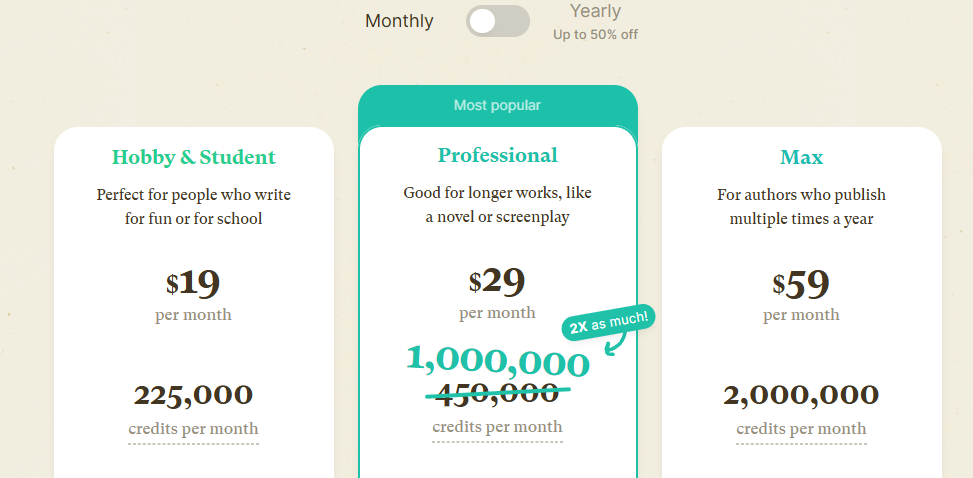
Sudowrite's $10 plan is the most expensive way to buy its credits. Hobby & Student gets you 225,000 credits for $10 a month on annual billing, while Professional gets you 1,000,000 for $22, so each Hobby credit costs about twice as much.
Every plan includes almost the same features, so the real choice is how many credits you'll burn, and that can swing more than 100x depending on which AI model writes for you.
We dug into Sudowrite's live pricing, its docs, and its own cost-of-a-novel math to show how far each plan actually gets you: credits translated into real scenes, chapters, and finished drafts.
Sudowrite Pricing at a Glance: The Three Plans
Sudowrite runs three consumer tiers. Per Sudowrite's pricing page and its plans documentation, every tier includes the same tools and 30+ AI models. Only the credit volume, whether credits expire, and one feedback feature change between them.
Pricing verified October 2026.
There's no permanent free plan. You get a free trial with no credit card required, which is your window to kick the tires before you pay.
What Sudowrite Credits Actually Buy
One thing the pricing table hides: a credit is not a word. Sudowrite's own breakdown of novel costs spells out why. Credit burn depends on the AI model you choose, how much of your story the model has to read first, and which feature you run.
The model gap is huge. In a January 2026 test, generating the same 200 words of story, GPT-5 Nano used about 70 credits while Claude 4.1 Opus chewed through more than 8,000. Same output, more than 100 times the cost.
Sudowrite's April 2026 cost breakdown gives the clearest per-word numbers it has published, measured in credits per 1,000 words:
- Budget (Basic mode on GPT-4o Mini, DeepSeek V3): about 350 to 1,000 credits. Fine for brainstorming and messy first drafts.
- Muse (Sudowrite's own fiction model): about 12,000 credits. The default in Write and Draft, and built only for fiction.
- Premium (Claude Opus-class models): about 20,000 to 40,000+ credits. Save it for the scenes that carry the book.
Here's what that looks like in real writing:
Treat these as estimates. The same feature can use different credits depending on the model and how much of your story it reads first, and Sudowrite says Professional's million credits can produce anywhere from 50,000 to 500,000 AI words a month. Other AI tools meter differently: Writesonic's pricing now tiers by AI-search tracking and article counts.
September 2026 Update: Sudowrite's New Models Use Fewer Credits
In late September, Sudowrite added Claude Opus 5.5, GPT-6 Sol and GPT-6 Luna and said each uses fewer credits than the model it replaces. Six days later, it added Sonnet 5.5 alongside Gemini 3.7 and 3.8 Flash, GLM 5.3, Qwen 3.8 Max and Grok 4.7. Here's how the new options compare on credits:
- GPT-6 Sol: roughly a third of Opus 5.5's credit cost.
- GPT-6 Luna: about a seventh of Opus 5.5's credit cost.
- Sonnet 5.5: about 30% cheaper than Opus 5.5.
Sudowrite also replaced the discontinued Claude model behind its "Excellent" Prose Mode with its own model, Ballad, and made Ballad 1.1 Excellent's engine in June. Rewrite now runs on Ballad too.
Sudowrite hasn't published per-word figures for the new models, but the direction is clear: each new model costs fewer credits than the one it replaces. The top Claude model is only barely cheaper, so the biggest savings come from switching to GPT-6 Sol or GPT-6 Luna.
Features That Cost No Credits
Quick Edit and Chat come with your plan and are free to use by default (each has an optional High Quality mode that does use credits). Rewrite and Describe are usually among the most credit-efficient features. Generating a full chapter from your Scenes is among the most expensive.
Plan-by-Plan: Who Each Tier Is For
Hobby & Student: $10/Month Annual or $19 Monthly
Hobby & Student gives you 225,000 credits a month. It fits writers who keep a steady pace, a chapter or two a week, mostly on budget or mid-tier models. Credits expire at the end of each cycle, so it rewards a steady habit over a once-a-quarter sprint.
Professional: $22/Month Annual or $29 Monthly
Professional is the one most active novelists land on. A million credits covers a full novel draft on Muse in a single billing cycle, with little to spare. It also unlocks Feedback (developmental edits, line edits, and beta reads), which Hobby doesn't get.
Max: $44/Month Annual or $59 Monthly
Max is for people running more than one book at a time, or experimenting hard across premium models. You get 2,000,000 credits, and the credits roll over for up to 12 months. If you write in seasons, that rollover is the whole pitch. Sudowrite's concierge pricing page also lists a free 30-minute Personal Setup Session (a $49 value) with Max, which must be used within 30 days of your first payment.
Credit Expiry and Rollover: The Professional vs Max Decision
Credit expiry and Max's double allowance are what separate Professional from Max, so let them decide which one you buy:
- Hobby & Student and Professional: unused credits expire at the end of every billing cycle. Use them or lose them.
- Max: unused credits roll over for up to 12 months, so a quiet month isn't money down the drain.
Match the plan to how you write:
- You write at a steady pace every month: pick Professional. A million credits covers a novel draft on Muse, and you'll use what you pay for.
- You write in bursts or juggle several books: pick Max. Three novels in the fall and nothing in spring? Rollover keeps your quiet-month credits alive.
- You take whole months off and pay monthly: pause instead. Monthly subscribers can pause billing and the credit refresh for up to three months, which costs less than paying for Max's rollover. Annual plans can't pause. Go to Settings → Manage Membership and finish the separate confirmation step, which Sudowrite warns is easy to miss.
One more detail: credits refresh at the exact time you signed up, not on the 1st. If you joined at 2:02 pm on the 5th, your unused credits expire, and new ones arrive at 2:02 pm on the 5th of every month.
What Happens When You Run Out of Credits
When you hit zero mid-chapter, you can buy a top-up as long as you have an active plan. Here's how it works:
- Buy a top-up. Go to Settings → Buy More Credits at any time while you have an active plan. Bought credits never expire, even if you pause or cancel later.
- Monthly credits go first. Sudowrite always spends your monthly allowance before your bought credits, so top-ups are saved for when you need them.
- Track your spending. Settings → Show Recent Activity lists each feature you used and the credits it cost.
- Big jobs show their price first. Draft gives you a credit estimate before it runs, and since August 2026 it won't charge past that estimate. A multi-step Chat plan that fails, such as a full manuscript review, no longer charges you either.
Sudowrite doesn't publish top-up prices outside the app, so check Settings before you count on them.
Monthly vs Annual: How Much You Save
Annual billing is where Sudowrite gets noticeably cheaper, and the discount is steepest at the bottom tier.
- Hobby & Student: $19 monthly drops to $10 on annual, about 47% off.
- Professional: $29 drops to $22, roughly 24% off.
- Max: $59 drops to $44, around 25% off.
Over a year, Professional saves you about $84 and Max about $180. Monthly billing still makes sense if you're testing the waters or writing one seasonal project and want to cancel after. Jasper discounts annual billing too, though its Pro plan is a single self-serve tier at $59 per seat a month on annual billing versus $69 monthly.
Cost per Credit: Which Sudowrite Plan Is Actually Cheapest
Professional and Max are the cheapest ways to buy Sudowrite credits, at $0.022 per 1,000 on annual billing. Divide each plan's price by its credits, and the $10 Hobby plan turns out to be the most expensive.
Two things stand out. Hobby costs about twice as much per credit as Professional on annual billing and nearly three times as much on monthly billing. On annual billing, Max's credits cost the same as Professional's ($0.022 per 1,000), so the extra $22 a month buys twice the credits and a 12-month rollover at the same rate.
On annual billing, 1,000 words on Muse costs about $0.26 on Professional or Max and about $0.53 on Hobby. If you regularly run out of Hobby's 225,000 credits, Professional is the better deal: it costs 2.2 times as much ($22 vs $10) but gives you more than four times the credits.
The pricing page also shows Professional's old 450,000-credit allowance crossed out next to the current 1,000,000, so the middle tier is a better buy than older reviews suggest.
Is Sudowrite Free? The Trial Explained
No, Sudowrite is not free beyond a trial. You can start a free trial with no credit card, and there's no permanent free tier after that. If you subscribe and change your mind, Sudowrite will cancel and refund you if you tell it within the first 7 days. Your documents stay yours either way: you can open and export them even without an active plan.
Use the trial to run a few passages through Write, Describe, and Rewrite and see whether the output sounds like you. Think of it as a short test drive before the paywall. If a genuinely free tier is a dealbreaker, budget tools like Rytr keep a permanent free plan, which Sudowrite doesn't. For work writing, HyperWrite also lets you start free with no credit card (more below).
Is Sudowrite Worth It? Yes for Novelists, Not for Everyday Work Writing
For the right writer, yes. Weighed against what you get, Sudowrite pricing is fair: if you write fiction and want sentence-level and paragraph-level help, the Describe, Rewrite, and Story Engine tools are genuinely good, and $22 a month is a bargain next to a human editor.
A developmental edit on a full novel runs into four figures: the Editorial Freelancers Association's latest rate survey puts fiction developmental editing at 3.0–3.5¢ a word, or about $2,400 to $2,800 for an 80,000-word draft.
The honest cons are real, though. Exports are limited to Word (.docx) files, a .zip of your project, and CSVs of Story Bible sections, with no PDF or EPUB export (you can print a clean copy with Ctrl/Cmd+P), so self-publishers still need a second tool for layout.
Sudowrite's new image tools make character portraits and worldbuilding art for your Story Bible, and it isn't built for book covers, audiobooks, or non-fiction.
If you also write non-fiction, you're buying a fiction tool and something else. Other rewriting-focused tools like Wordtune price their plans around a different job entirely.
Sudowrite is built for novelists. If most of your writing is for work, a tool that writes with you where the work already happens will save more time than a fiction co-writer. That's where HyperWrite comes in.
Write Professional Drafts Faster With HyperWrite
Sudowrite prices its plans around novel output, measured in credits and chapters. A professional's day runs on shorter drafts: a client update between meetings, a rewritten LinkedIn post, a proposal cleaned up with four tabs open. The blank page shows up 30 times a day, long before you ever get near a manuscript.
HyperWrite is built for exactly that. It's an AI writing assistant with autocomplete, web search, and citations, and it writes in your own voice wherever your work happens.
Here's what HyperWrite does for that kind of work:
- Draft and revise in one workspace. The AI Document Editor gives feedback on your draft, rewrites any passage, and its built-in chat can see the whole document and apply changes for you.
- Skip the blank page. AutoWrite drafts paragraphs in any format, from client updates to LinkedIn posts.
- Keep your own voice. Personas teach HyperWrite how you write, so suggestions match your tone.
- Get answers faster. HyperWrite's AI Writing Assistant runs faster than ChatGPT-style thinking models, with prompts tuned from years of A/B testing.
- Write in any tab, too. The Chrome extension adds TypeAhead, which reads what's open in your browser and suggests your next line in Gmail, Google Docs, or your CRM.
- Try it before you pay. Start for free, no credit card required.
What HyperWrite costs: a free account gets limited monthly credits. Premium is $16 a month on annual billing ($19.99 monthly) and includes unlimited TypeAheads and 3 custom personas. Ultra is $29 a month on annual billing ($44.99 monthly) for unlimited AI messages and 10 personas.
Professionals at Google, Netflix, LinkedIn, and Spotify already write this way. The shift is small, but it adds up: less time staring at an empty field, more time sounding like yourself on the first try.
Try HyperWrite's AI Document Editor for free and take your next client update or proposal through it to see if it fits.
Frequently Asked Questions
How much does Sudowrite cost?
Sudowrite costs $10, $22, or $44 per month on annual billing for the Hobby & Student, Professional, and Max plans. Billed monthly, the same three tiers run $19, $29, and $59. The plans differ by credit allowance, whether credits expire, and Feedback, which only Professional and Max include.
Does Sudowrite have an unlimited plan?
No. Every Sudowrite plan runs on a monthly credit allowance, topping out at Max's 2,000,000 credits. If you run out, you can buy top-up credits that never expire. Writers have asked for an unlimited tier on Sudowrite's feedback board, but the request is still marked Proposed.
Is Sudowrite worth the money?
Yes, for fiction writers who want prose-level help, with the Professional plan at about $22 a month landing far below the cost of a human developmental editor. It's a weaker buy if you need EPUB or PDF export, dedicated cover design, audiobooks, or non-fiction support.
What's better than Sudowrite?
For professional or business writing, a context-aware co-pilot like HyperWrite fits better than a novel-first tool. For fiction, Sudowrite still covers prose help well, but self-publishers will need a separate tool for formatting and covers. For more work-writing options, see this roundup of QuillBot alternatives for pro writers.
Do Sudowrite credits roll over?
Yes, but only on the Max plan, where unused credits carry for up to 12 months. On the Hobby & Student and Professional plans, credits expire at the end of each billing cycle. Credits you buy as top-ups never expire on any plan.
Is there a free version of Sudowrite?
No. Sudowrite has no permanent free plan. New users get a free trial with no credit card required, and after that, a paid plan is required to keep using the AI features.
Can I get a refund from Sudowrite?
Yes, within 7 days. If you contact Sudowrite in the first week of your plan, it will cancel your plan and refund you. After that, you can cancel at any time, and your documents stay available to open and export.
Which Sudowrite features don't use credits?
Quick Edit and Chat are included with every plan and don't use credits by default. Each has an optional High Quality mode that does. Most other AI features, including Write, Rewrite, Describe, and Draft, spend credits, though Sudowrite sometimes runs free models or free beta tests for a limited time.
Can I pause my Sudowrite subscription?
Yes, on monthly billing. Monthly subscribers can pause billing and the credit refresh for up to three months from Settings → Manage Membership. Annual plans can't be paused, only canceled.

HyperWrite is the AI writing assistant that learns your style. It handles drafting, editing, and researching so you can focus on ideas.
- Autocompletes sentences as you type
- Works inside Google Docs & Gmail
- Adapts to your personal writing style
- 500+ AI tools for any writing task

Powerful writing in seconds
Improve your existing writing or create high-quality content in seconds. From catchy headlines to persuasive emails, our tools are tailored to your unique needs.