
Copy.ai vs Jasper vs HyperWrite: Which One Actually Works?


Copy.ai, Jasper, and HyperWrite can all generate content. The difference is how they fit into your workflow, and which one actually saves time in day-to-day writing.
Copy.ai vs Jasper vs HyperWrite: At a glance
Pricing based on annual billing, verified from official vendor pages as of April 2026.
Choose Copy.ai if: you're on a sales or GTM team running automated outreach sequences or producing short-form copy at volume. Note: the automation features that define Copy.ai only unlock at the Growth plan ($1,000/mo).
Choose Jasper if: you run a content marketing team producing long-form, SEO-optimized articles at scale and need a consistent brand voice across multiple writers.
Choose HyperWrite if: you write across Gmail, Google Docs, LinkedIn, and other browser tabs all day and want AI that works inside your existing workflow.
Meet the contenders
Copy.ai: A copywriting tool that became a GTM platform
Copy.ai started as a short-form copy generator and has since pivoted into a GTM automation platform. It's built around multi-step workflow automation, CRM integrations with HubSpot and Salesforce, and AI Agents that handle outreach sequences end to end.
Those automation features sit behind the Growth plan at $1,000/month. The entry-level Chat plan at $24/month (annual) gives you templates and chat, which are useful but not what defines the product. If you're on a sales or revenue team running outbound at volume, it earns its cost. But it can feel heavier than necessary if you only need help with everyday writing.
Jasper: Long-form content at scale, for teams
Jasper is built for marketing teams that produce a lot of content and need it to stay on-brand across multiple writers. Its Google Docs-style editor, brand voice training, and Surfer SEO integration make it the strongest for structured, long-form output.
Jasper works best when your team has a defined content operation: consistent volume, clear brand guidelines, and enough output to justify the per-seat cost. For quick, in-the-flow writing across tabs, it’s less practical.
HyperWrite: Built for how professionals actually write
HyperWrite focuses on the writing you already do all day: emails, docs, and messages across multiple tabs. Its TypeAhead feature suggests full sentence completions inside your browser (Gmail, Google Docs, LinkedIn, and more), so you don’t have to switch tools or break your flow.
Personas adapt to your writing style over time, which makes suggestions sound closer to how you naturally write. It’s strongest for day-to-day professional writing, but it’s not designed for bulk content production or sales automation workflows.
Copy.ai vs Jasper vs HyperWrite: Feature breakdown
Workflow fit
Copy.ai: The automation is the strongest thing Copy.ai does, but it requires setup, and the Growth plan to unlock. If you're running LinkedIn prospecting into personalized email sequences at scale, it delivers. Not the right fit if you're looking for help with day-to-day writing like emails or internal docs.
Jasper: Works best when you sit down to produce a full piece, like a blog post or campaign draft. That structure helps with long-form output, but it doesn’t carry over well to quick, in-between writing across tabs. If your workflow is more “open one doc and write,” it fits.
HyperWrite: TypeAhead runs inside Gmail, Google Docs, and every other browser tab you're working in, so suggestions appear without breaking your flow. For professionals writing 20-plus emails, updates, and documents a day, that kind of continuity saves time.
Winner: HyperWrite. For daily professional writing across browser-based tasks, it's the only tool that stays inside your workflow instead of asking you to step outside it.
Writing in your own voice
Copy.ai: The Infobase feature stores brand guidelines, tone preferences, and product details for the AI to pull from. It's built for brand consistency across a team, which works well for GTM copy but falls short for individual professional writing.
Jasper: Jasper’s brand voice training is the most structured. You can upload style guides or past content, and it will generate outputs that follow those patterns consistently. This works well for teams managing multiple writers or clients who need consistent tone across large volumes of content. It’s less focused on adapting to how one person writes in real time.
HyperWrite: Adapts to how you personally write. Personas learn from your past writing, so suggestions start to match your tone, phrasing, and sentence structure over time. This happens in the background as you write, which makes it useful for day-to-day communication like emails, updates, and client messages.
Winner: HyperWrite. For individual professionals, matching your natural writing style in everyday work is more useful than managing a formal brand voice system.
Content type and output quality
Copy.ai: Performs best on short-form content like ads, email subject lines, product descriptions, and social copy. Its strength is speed: you can generate multiple variations quickly using pre-built workflows and prompts. For longer or more nuanced writing, outputs often need more editing, especially when tone or structure matters.
Jasper: Built for long-form content, especially blog posts, landing pages, and SEO-driven articles. The editor, combined with tools like Surfer SEO, makes it easier to structure and optimize full pieces from start to finish. If you’re producing content at volume, it holds up better than the others in maintaining consistency across longer drafts.
HyperWrite: The AI Tools Library covers hundreds of specific writing tasks, from email responses to rewrites, summaries, and proposals. It's strong for the writing that fills most professional workdays. First drafts come quickly, but polished long-form output isn't where HyperWrite is designed to compete.
Winner: Jasper. For structured, long-form content, it produces the most complete drafts with the least rework, especially for teams focused on SEO and content marketing.
Integrations and ecosystem
Copy.ai: Native integrations with HubSpot, Salesforce, and 2,000-plus apps mean it plugs directly into existing sales and marketing stacks. For a sales team running outbound sequences from inside their CRM, nothing here comes close.
Jasper: Integrates with Surfer SEO, Grammarly, and Google Docs. Strong for content workflows but not built for sales or CRM-native use cases.
HyperWrite: Integrates with Gmail, Google Docs, LinkedIn, and most browser-based tools through the Chrome extension. That covers the daily writing workflow for most professionals, but it stops there. No CRM connections, no sales stack integrations.
Winner: Copy.ai. If your workflow runs through a CRM, the integrations alone justify the cost.
Team and collaboration
Copy.ai: Team features exist at the Chat level, but the real collaboration tools, including shared Infobase and AI Agents, require the Growth plan.
Jasper: Shared brand voice, Campaigns, multi-user workspaces, and approval workflows make it the most complete option for agencies or content teams with multiple writers producing on-brand output simultaneously.
HyperWrite: Built for individual professionals. Personas are tied to individual accounts, and there's no shared workspace or multi-user content production setup.
Winner: Jasper. For marketing teams where voice consistency across multiple writers is a real operational problem, Jasper is the only tool built to solve it.
Pricing and value
Copy.ai: The Chat plan costs $24/month (annual) and covers templates and unlimited chat. This is a reasonable entry point for individuals. The automation features that actually define the platform don't unlock until the Growth plan at $1,000/month. Most users pay for Chat and never access what makes Copy.ai worth the pivot.
Jasper: No free plan, just a 7-day trial. Pro starts at $59/month per seat (annual), which is hard to justify for solo writers or small teams with moderate output. For a dedicated content team running SEO articles at scale, the Surfer SEO integration alone can offset the cost if it replaces a separate subscription.
HyperWrite: The most affordable of the three, with a free tier to start. At annual billing, Premium is at $16/month for individual professionals and Ultra at $29/month for unlimited AI messages and advanced features. TypeAhead has no usage caps on either paid plan.
Winner: HyperWrite. At $16/month (annual) with a free tier to start, it delivers the best value for individual professionals. The other two tools only justify their cost at usage levels most individuals never reach.
What real users say
Copy.ai
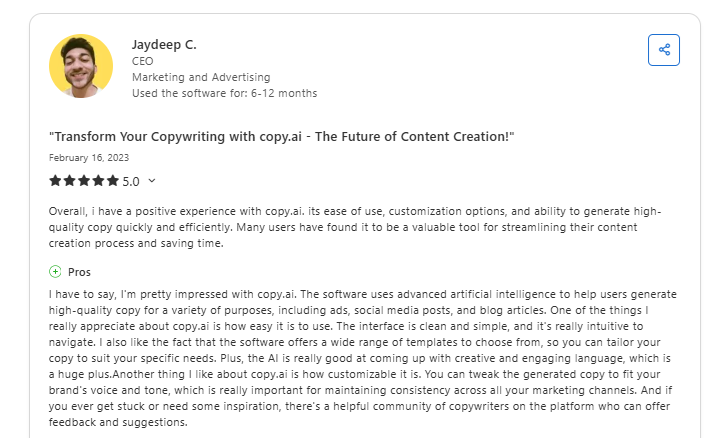
Pros: Users point to speed and variety as the main strengths. Template coverage and fast generation make it easy to produce short-form content quickly. Marketing CEO Jaydeep C., who used the tool for 6-12 months, shared that "the AI is really good at coming up with creative and engaging language."
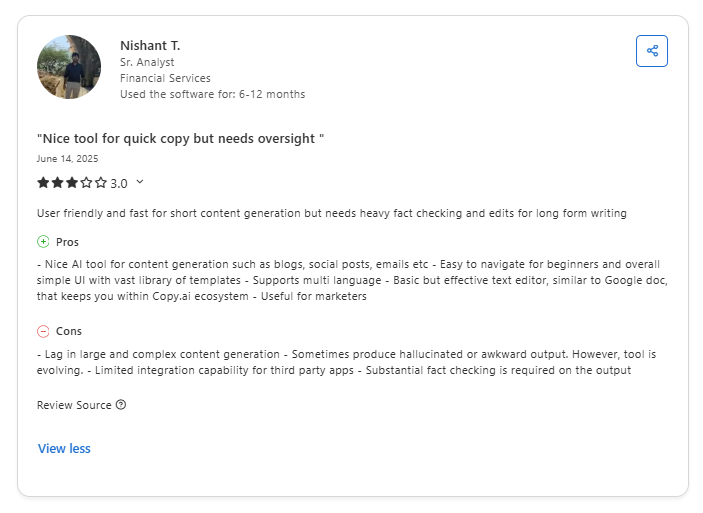
Cons: Editing load is the most consistent complaint. Users report needing to rewrite or refine outputs before they’re usable. Nishant T., a senior analyst in financial services, notes that results can “sometimes produce hallucinated or awkward output.”
Jasper

Pros: Jasper’s strength shows up in brand voice control and long-form output. A Capterra reviewer called it a “simple, easy way to turn one piece of content into dozens.” It’s often used for first drafts and outlines, especially when working from existing content.

Cons: Some users feel the features offer no real advantage over free tools like ChatGPT. Roddy T., a manager who used Jasper for 2+ years, says, "It requires heavy editing for quality output." Others flag that it occasionally hallucinates facts, which is worth keeping in mind for any research-heavy content.
HyperWrite
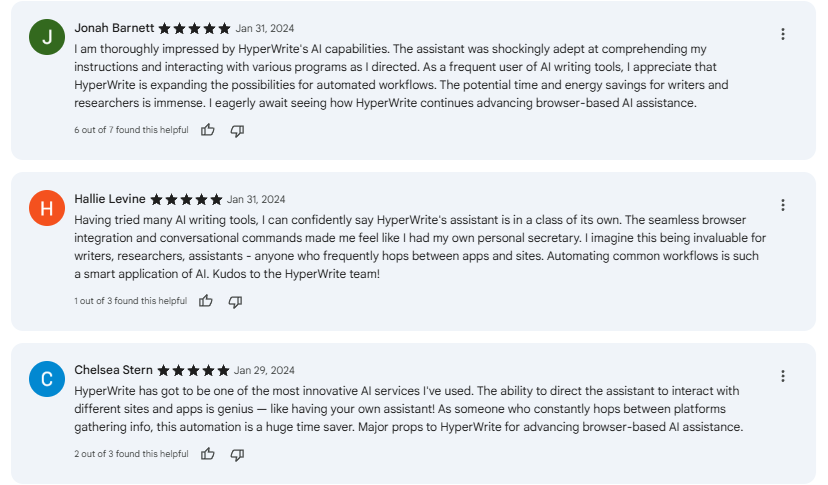
Pros: Reviewers in marketing, operations, and executive roles highlight that TypeAhead saves time without pulling them out of their workflow. One reviewer noted the AI "understood the nuanced changes I needed in tone, content, and length."
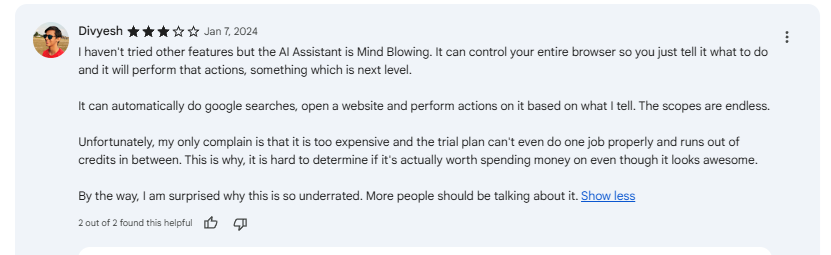
Cons: Some users mention hitting limits on the free plan, particularly around message credits. A smaller number of reviews also point to occasional pauses in TypeAhead suggestions mid-sentence, which can interrupt flow.
Which tool should you choose?
All three tools overlap on basic AI writing. The real differences show up in how they fit your actual workflow and how much you're producing.
Choose Copy.ai if you:
- Work in sales, revenue operations, or GTM and need to automate multi-step workflows
- Produce high volumes of short-form content like ads, outreach emails, and product descriptions
- Plan to use CRM integrations or workflow automation as part of your process
Choose Jasper if you:
- Work in a content marketing team producing long-form articles at scale
- Need consistent brand voice across multiple writers or clients
- Rely on structured workflows for blog posts, landing pages, or SEO content
Choose HyperWrite if you:
- Write across Gmail, Google Docs, LinkedIn, and other browser tabs all day
- Want AI that stays inside your workflow without a tab switch or setup investment
- Want suggestions that adapt to your voice over time
The honest verdict
Copy.ai and Jasper have both moved upmarket: one toward GTM automation, the other toward content production at scale. If that's your world, they earn their cost.
But most professionals aren't running a sales automation stack or a 50-article-a-month content operation. They're writing emails, updates, and documents across a browser all day.
For that, HyperWrite is the stronger fit. It's the only tool of the three that stays in your workflow instead of asking you to build one around it.
Try HyperWrite in your real workflow
HyperWrite's free plan includes TypeAhead, so the easiest way to evaluate it is to install the Chrome extension and use it through a normal workday.
If you want to go further, the AI Writing Assistant takes any topic or format and returns a full draft in seconds. Both are available on the free plan before you commit to anything.
Try the TypeAhead Chrome extension free, no credit card needed.
Frequently asked questions
Is Jasper good for beginners?
Jasper isn't the most beginner-friendly starting point. The editor is capable, but features like brand voice training, Jasper IQ, and campaign workflows take time and a defined content operation to get real value from. It's built for marketing teams that already know what they need.
What is the difference between Copy.ai and Jasper?
The main difference between Copy.ai and Jasper is what they're built to do. Copy.ai is a GTM automation platform focused on sales workflows, outreach sequences, and short-form copy at volume. Jasper is a content marketing platform built for long-form output, brand consistency, and SEO at scale.
How does HyperWrite work inside Gmail?
HyperWrite works inside Gmail through its Chrome extension, which adds TypeAhead suggestions directly into your compose window as you type. You don't need to leave Gmail or copy text between tabs. Suggestions adapt to your writing style over time through custom Personas.

HyperWrite is the AI writing assistant that learns your style. It handles drafting, editing, and researching so you can focus on ideas.
- Autocompletes sentences as you type
- Works inside Google Docs & Gmail
- Adapts to your personal writing style
- 500+ AI tools for any writing task

Powerful writing in seconds
Improve your existing writing or create high-quality content in seconds. From catchy headlines to persuasive emails, our tools are tailored to your unique needs.