
ProWritingAid Reviews 2026: A Deep Dive for Authors


Grammar checkers tell you a sentence is wrong. ProWritingAid tells you that you've opened four chapters in a row with the same construction, and that your dialogue tags cluster in the back half of the book.
That distinction is why novelists put up with an interface that takes a week to learn. We've spent enough time with the app and with ProWritingAid reviews from other authors to see where it actually earns its keep. This review covers what the tool does for book-length work, what the 2026 pricing comes to, and the one charge authors keep discovering after they subscribe.
Quick verdict
ProWritingAid's 25+ manuscript-wide reports catch pacing, repetition, and dialogue problems that inline grammar checkers miss. The free plan is too capped to be useful, and whole-book features need Story Credits on top of a subscription. Best for novelists and long-form writers who edit in structured passes; less so if you mostly write email and short docs.
What is ProWritingAid?
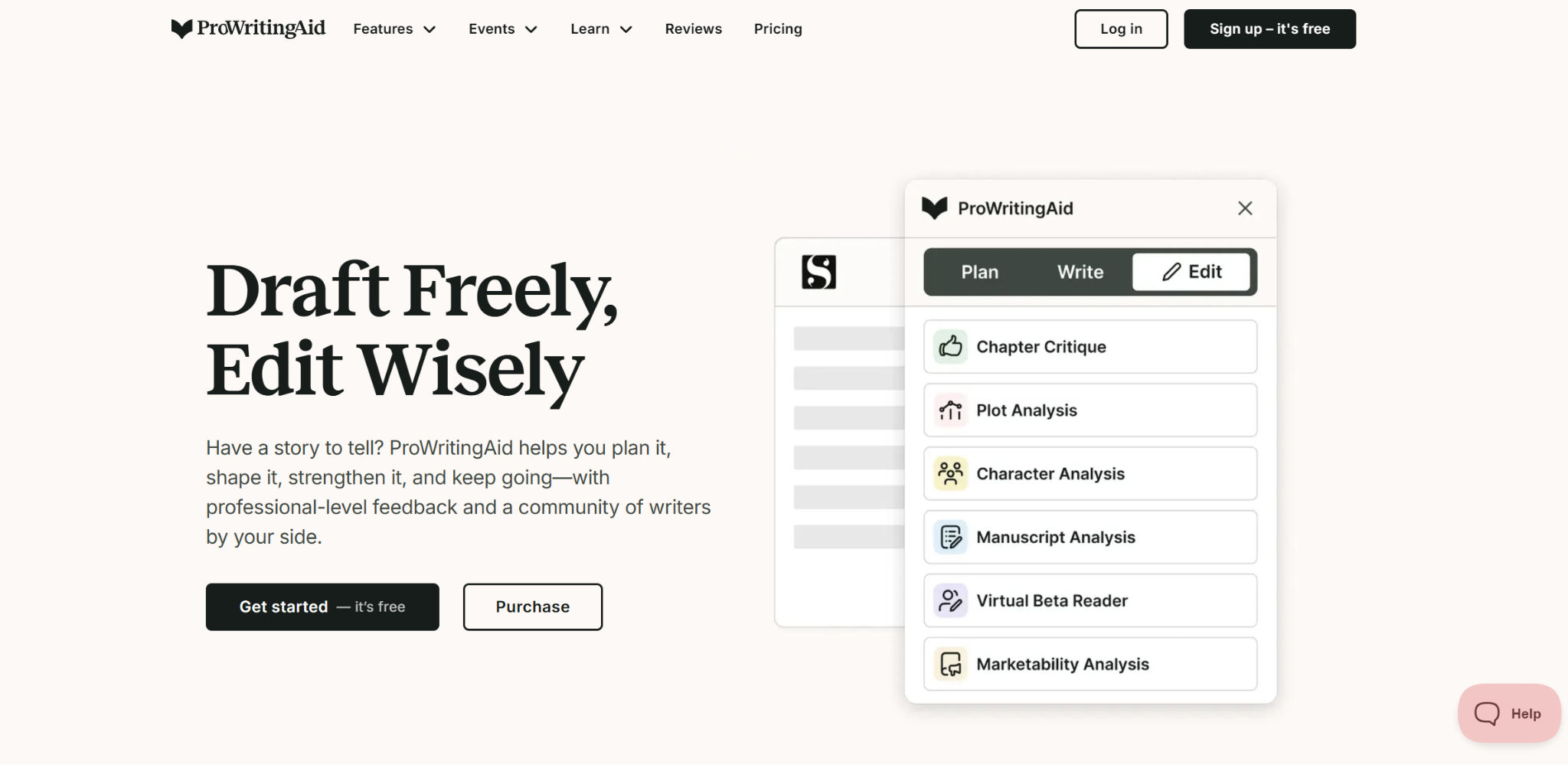
ProWritingAid is a writing analysis platform built for authors. It checks grammar and spelling, then layers on manuscript-level reports covering style, pacing, readability, and structure across a whole book.
Paid plans lift the word cap entirely so the 25-plus reports run across a whole manuscript, and its Scrivener integration lets novelists run them without exporting the draft.
ProWritingAid features: The 6 reports authors actually use
The 25-plus reports are the product. A handful do most of the work for fiction writers.
- Pacing. Flags passages where the narrative slows, which is hard to judge while you're inside a scene.
- Repeats and overused words. Surfaces the adverb you lean on and the phrase you've used in six chapters.
- Sentence variety. Charts sentence length across a chapter, exposing monotonous rhythm.
- Dialogue tags. Counts and locates tags, catching the "he exclaimed" habit before a reader does.
- Sticky sentences. Highlights sentences padded with filler words that slow a reader down.
- Readability. Scores passages so you can match register to your audience.
Two AI features sit alongside the reports. Sparks offers sentence-level suggestions, and Rephrase rewrites individual lines. Both stay narrow by design, which suits authors wary of a tool rewriting their voice.
ProWritingAid pricing in 2026
ProWritingAid restructured its pricing in 2026, with the annual and lifetime rates both increasing. The figures below come from the current pricing page.
Pricing verified September 2026.
The free plan works as a demo. It caps checks at 500 words, two report runs a day, with 10 Rephrases and 3 Sparks thrown in. For a novelist, 500 words barely covers a page and a half.
Premium is where the tool becomes usable. The word cap disappears, report runs go unlimited, and the full 25-plus report set unlocks.
Premium Pro mostly adds volume but not new capability, raising Sparks to 50 a day, Chapter Critiques from 1 to 30 a day, and including live author workshops and community events.
Whether it's worth it depends on how long you'll use it. Premium at $120 a year already beats most competing subscriptions, and the $399 lifetime license breaks even in about three and a half years. A good deal for a career novelist, a poor one for anyone still testing the category.
Story Credits: What a Premium subscription doesn't cover
Five features authors specifically want aren't in any subscription. These all run on Story Credits, purchased separately from Premium or Premium Pro.
- Manuscript Analysis reviews pacing, repetition, structural flow, and tone consistency across your whole book, the patterns only visible chapter to chapter.
- Plot Analysis checks your story against a three-act structure and flags where tension slackens, arcs stall, or momentum drops.
- Character Analysis maps how your characters work across the manuscript, showing where they connect with readers, where they fade, and where their motivations need shoring up.
- Virtual Beta Reader gives first-person feedback on plot, characters, and dialogue, written the way a real reader would react.
- Marketability Analysis positions the finished book, with market insights and ready-to-use materials for pitching or publishing.
Each run costs one credit at $50 on the free tier, and subscribers get up to 40% off on Premium and up to 65% off on Premium Pro; the biggest discount applies to the 10-credit pack, with smaller packs discounted less. Credits don't expire, but they're non-refundable, so buy a bundle only once you're ready to use it.
Budget for this separately if manuscript-level feedback is the reason you're subscribing. A novelist reading the marketing could reasonably assume all five come with Premium. They don't.
What authors say in ProWritingAid reviews
Across G2, Capterra, and Trustpilot, the pattern is consistent. ProWritingAid reviews praise the depth of its reports and how cleanly it integrates into existing tools, and the recurring complaints are the free plan's limits and the missing mobile app.
Pros
✅ Fits into tools you already use. Editing inside Word, Docs, or Scrivener means no copy-paste step to break your concentration. G2 reviewer Nancy S., a marketing consultant, says, "This software integrates with everything and makes my writing so much better."
✅ Depth of feedback. You control what runs and how strict it grades: turning reports on or off, dialing rules per document type, and setting exceptions for dialogue or clichés. As Trustpilot reviewer Laura puts it, "I like how much feedback options [ProWritingAid] has."
✅ More than a single-purpose checker. Beyond grammar, it flags readability issues, overused words, and awkward sentences, doing more than what a basic checker typically covers. Capterra reviewer Brian R., an illustrator, says it’s "great for checking readability, pointing out clu[n]ky sentences, over used words."
Cons
❌ Most of it sits behind Premium. The free plan's 500-word cap rules out manuscript work entirely, and most reports need a paid plan to unlock. Veronika Sudomova writes on Trustpilot that "most of the features cannot be used unless you have a premium membership."
❌ Mobile keyboard. Editing away from a desk isn't really an option, since there's no dedicated app to type in. G2 reviewer Kelly W., a marketing specialist, notes there’s "no ProWritingAid keyboard…which means you have to use it in the browser."
❌ No built-in humanizer. ProWritingAid rewrites and checks tone, but it doesn't include a dedicated tool to make AI-assisted text read as less machine-generated. Mohamad A., a counselor, writes on Capterra, "What I wish for Pro is it has a humanizer."
Is ProWritingAid right for you?
It’s a great fit if you:
- Write fiction or long-form nonfiction and revise in structured passes.
- Draft in Scrivener, Word, or Google Docs and want reports without exporting.
- Prefer diagnosing patterns over accepting inline corrections.
- Plan to use one tool for years, where the lifetime license pays off.
Look elsewhere if you:
- Write mostly email, Slack, and short documents, where the report depth goes unused.
- Need a mobile keyboard or heavy phone-based editing.
- Want a tool that helps produce a first draft.
- Test tools briefly, since the free plan won't show you what you're buying.
The final verdict
Between the reports and the way authors talk about them, it's clear why ProWritingAid earns its reputation among novelists. Nothing else reports on a book the same way. It surfaces patterns you can't see from inside the text, and holds a whole draft in view at once.
The reservations are real, though. The free plan told us nothing useful, the interface asked for a solid week of patience to learn, and the author-specific analysis costs extra on top of a subscription. Weigh the lifetime license if you write books for a living, and skip the tool entirely if your writing rarely runs past a thousand words.
What ProWritingAid can't do for you
Every one of those 25-plus reports needs a draft to analyze first. The blank page is still yours, and most authors pair ProWritingAid with something that helps fill it.
For tightening a passage you've already written, QuillBot does the narrower rewording job at a lower price. If you'd rather rephrase in-line while keeping your own cadence, Wordtune is closer to what you want. And if you're still shopping the category and want to see the field ranked side by side, this roundup of 14 Grammarly alternatives covers the rest.
For the blank page itself, HyperWrite is built to fill it.
Its AI Writing Assistant drafts, AutoWrite turns a prompt into a first pass, and the AI Document Editor holds a longer piece as it grows. TypeAhead reads the tabs you already have open, pulling context from your research and notes so its suggestions land in your voice, and Personas keeps it sounding that way throughout.
Staring at a blank page before ProWritingAid can even help? Try TypeAhead free with the Chrome extension and see how HyperWrite gets you to a first draft faster, so the reports always have a manuscript to work on.
Frequently asked questions
Is ProWritingAid worth it?
Yes, ProWritingAid is worth it for authors and long-form writers who revise in structured passes. Its 25-plus manuscript reports catch pacing, repetition, and structural problems that inline grammar checkers miss. Writers producing mostly short documents get less from it.
How much does ProWritingAid cost in 2026?
ProWritingAid costs $30 a month or $120 a year for Premium, with a $399 one-time lifetime license. Premium Pro runs $36 monthly or $144 annually, with a $699 lifetime option. There is a free plan, capped at 500 words per check.
Is the ProWritingAid free plan enough?
No, the ProWritingAid free plan is too limited for manuscript work. It caps checks at 500 words and allows two report runs a day, which suits testing the interface but not editing a chapter, let alone a book.
Does ProWritingAid include Manuscript Analysis?
Manuscript Analysis is not included in any subscription tier. It runs on Story Credits, purchased separately, as does the Virtual Beta Reader. Paid plans receive a discount on credits, and Premium Pro gets the largest reduction.
Is ProWritingAid better than Grammarly?
It depends on the job. ProWritingAid is better for editing book-length manuscripts, and Grammarly is better for real-time correction across email and everyday documents. Many writers subscribe to one and use the other's free tier. Our ProWritingAid vs Grammarly breakdown covers which wins on which axis.

HyperWrite is the AI writing assistant that learns your style. It handles drafting, editing, and researching so you can focus on ideas.
- Autocompletes sentences as you type
- Works inside Google Docs & Gmail
- Adapts to your personal writing style
- 500+ AI tools for any writing task

Powerful writing in seconds
Improve your existing writing or create high-quality content in seconds. From catchy headlines to persuasive emails, our tools are tailored to your unique needs.